Bad email data can cause more damage than teams initially see. It raises bounce risk, weakens email deliverability, and makes campaign reporting less trustworthy.
Over time, it can also hurt inbox placement and sender reputation.
Teams need a way to catch weak records before they pile up in the database and you start sending emails.
Email verification is the process built for that. It helps flag invalid, risky, and low-quality addresses before they create bigger problems in your list, leaving you with more usable email addresses for your campaign.
This article explains how email verification works, what a tool actually checks, where those checks can fall short, and how the process helps you clean your email list before bad data spreads any further.
Email verification is the process of checking whether an address follows a valid email address format, belongs to a real domain, and has an inbox that can receive mail.
That starts with basic checks, but it does not stop there. A solid email address verification workflow also looks at domain setup, mailbox behavior, and server responses to decide whether a record belongs in your system or should be filtered out.
A list can look clean in a spreadsheet and still be full of issues. Some addresses don’t exist, some have simple typos, and some come from dead domains. You also get disposable email addresses that were never going to turn into users or real potential customers.
Once those records get into your database, they disrupt everything. Sending email campaigns to undeliverable addresses increases bounce rates, especially when nonexistent or inactive inboxes result in hard bounces.
So the goal is simple. You want to validate emails in the database and remove junk that wastes money, skews reporting, or weakens the delivery of later messages.
Email validation is usually the first filter, while verification digs deeper into the address.
At the validation stage, email validation tools check email addresses for basic problems. They look at the structure, confirm the address is properly formatted, and flag syntax errors or invalid characters.
But passing those checks does not mean the address belongs to a working inbox. An address can look perfectly fine and still lead nowhere.
That is where verification goes further. It checks the domain, looks at mailbox signals, and tries to determine if the email address exists and can receive mail.
The difference becomes more practical once those addresses enter real workflows.
A typo in a newsletter field may seem minor, but the same bad address in onboarding, account creation, or outbound sales can waste time and create problems once you start sending.
Validation catches obvious errors at intake. Verification gives you more information about the address before it reaches your email campaigns, product messages, or other workflows that rely on usable contact data.
The email verification process checks more than whether an address looks right. It starts with basic formatting, then digs into the domain, mailbox, and potential risks.
Here’s what happens at each stage.
A syntax check reviews the structure of an email address to see if it follows the expected format.
The system looks at:
It also catches syntax errors, extra spaces, and other formatting mistakes that can make an address invalid before anything more advanced needs to happen.
These are basic checks, but they catch mistyped inputs, malformed entries, and obvious invalid addresses before those records reach the database.
Catching these errors early also keeps obviously undeliverable emails from making it into your sending list.
Domain validation checks the email domain behind an address. It confirms the domain is active and properly configured to receive email.
The system looks for MX records, short for mail exchange records, which tell sending systems where the domain receives email.
Finding a valid MX record shows that the domain exists and has mail routing set up to receive emails. If the domain is dead, broken, or has no usable MX record, the address can fail at this stage.
Some invalid email addresses look fine on the surface and only fail once the domain check runs. An email validation API can run these checks as addresses enter a form, product, or database.
Mailbox confirmation moves closer to the real question, which is whether the email account appears able to receive mail.
This stage often relies on Simple Mail Transfer Protocol (SMTP) validation. The verifier starts a limited conversation with the receiving SMTP server and checks how it responds to the address without delivering an actual email.
The server might accept emails for the address, reject them, or respond in a way that leaves the mailbox unconfirmed. Even if the server accepts the address, that does not always mean there is a real intended recipient behind it.
Mailbox providers control how much information they reveal, so SMTP checks sometimes have limited signals to work with.
A valid format and working domain only tell you part of the story. Mailbox confirmation goes one step further by checking how the receiving server responds before you start sending emails in production.
Disposable email detection looks for temporary inboxes and disposable domains that create low-value records.
These addresses show up a lot in free trials, low-intent signups, and spammy submissions. They may work for a short time, but they rarely help with long-term communication or clean reporting.
An address can pass syntax and domain verification and still be a weak contact for onboarding, lifecycle messaging, or sales follow-up.
Risk detection goes beyond checking if an address can receive mail. It looks for risky emails that may still create problems once you start sending.
Spam traps, stale inboxes, recycled addresses, and some role accounts can all create problems once your marketing emails go live.
Even when they do not bounce, they can still distort engagement metrics, weaken inbox placement, and increase the likelihood that future messages will land in the spam folder.
Over time, these signals can also contribute to a poor reputation with mailbox providers.
That broader view is why email service providers pay attention to list quality alongside complaints, engagement, and sending practices.
Real-time API verification checks a single email address the moment a user submits it.
Real-time checks work well for web forms, product onboarding, checkout, and the signup process. If the system catches weak records before they are stored, they never get the chance to spread into automations, support tools, or other marketing software.
Checking an address as soon as someone enters it is a practical best practice for keeping bad data out of your database.
During signup or account creation, verification can also support fraud prevention by flagging disposable or suspicious addresses for review.
API integration lets teams connect verification directly to the points where data enters the stack. It also helps products verify emails before those records trigger downstream workflows.
Bulk email verification handles the records you already have.
Outdated customer relationship management (CRM) exports, event leads, enrichment outputs, and contacts stored in Google Sheets keep aging. By the time your team wants to use them, some addresses may no longer exist or be worth reaching out to.
Before starting your next email marketing campaign, upload your contact list, review the verification results, and remove weak records before sending messages. In practice, that is what list cleaning looks like once data has already piled up.
Catch-all emails are harder to verify because the mail server may accept mail for almost any address at that domain, even when a specific inbox is not actually usable.
That breaks the normal logic behind mailbox checks. A standard check expects the server to accept real inboxes and decline fake ones. A catch-all setup can say “yes” to both, so the response looks promising while still leaving a lot unresolved.
Catch-all records create real friction in B2B data. Teams can end up suppressing addresses they already paid to acquire, or they can keep those records and accept that emails bounce for reasons they do not fully understand.
They can also run into false positives when a result looks usable but still lacks enough certainty for a live campaign.
The problem usually looks like this:
Listmint addresses that problem with real-time catch-all verification, which helps teams evaluate catch-all addresses beyond the initial SMTP result.
Sign up for free and verify catch-alls with ease.
The best email verification service starts with the workflow, not the feature table or pricing chart.
A team cleaning a quarterly list does not need the same features as a product team validating addresses in real time. That sounds obvious, but it is where a lot of buying mistakes begin.
First, you need to know where bad data enters the system. If the problem starts in signup and onboarding, you need real-time verification. If the bigger issue is stale data in existing databases, you need bulk email verification and results your team can act on.
The next question is about results. A status like “unknown” can be technically honest, but it does not help you decide what to do with the address.
Accurate results help, but your team also needs enough detail to know what to do next. A good email checker should make it easier to decide which contacts to keep, review, or remove.
As you compare tools, focus on the details that will affect day-to-day use:
Basic checks can tell you a lot, but they do not always give you the full answer. A tool may catch formatting mistakes and bad domains while still leaving harder addresses unresolved.
That is especially relevant with catch-all domains, where standard verification may not confirm the individual mailbox. Look for a tool that gives you accurate information you can actually use when reviewing these results.
Listmint combines standard verification with real-time email verification and dedicated catch-all verification, giving teams another way to evaluate addresses that are difficult to verify.
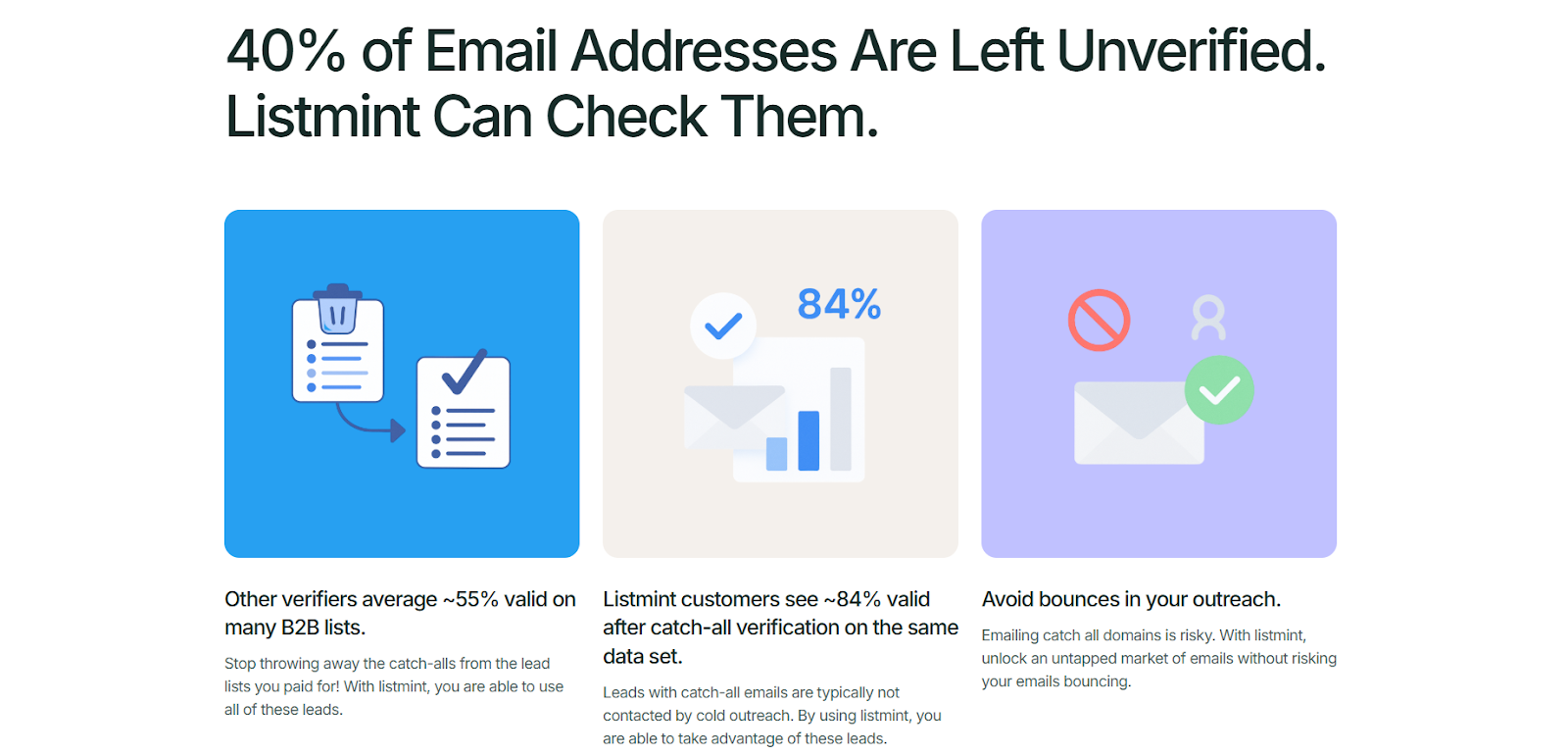
Listmint is an email verification platform that combines standard email verification with dedicated catch-all verification for bulk lists and real-time API checks.
Unclear statuses force teams to suppress too much of the email list or keep weak records and hope for the best. Listmint is built to reduce that uncertainty.
It verifies standard addresses, handles catch-all records in real time, and does it without sending test messages. For B2B teams, that can mean more usable contacts from the same file and fewer decisions based on guesswork.
If bad data keeps showing up through forms, imports, or older lists, our catch-all verification helps you clean the list earlier and protect sender reputation before those records turn into an email deliverability problem.
Verify your email list with Listmint. Get started for free.
Yes. If you use an email list for marketing or sales, verification helps you find bad addresses before you send to them. It can reduce avoidable bounces and keep unreliable contacts out of active campaigns.
Email verification can take seconds for a single address, though timing depends on the verification service and how the receiving email server responds. Bulk lists can take longer because the tool needs to process a larger number of addresses.
The simplest way to check an email address is to run it through an email verification tool. A free email checker can give you a quick result for one address, while bulk verification tools are better suited to larger contact lists.
If an email address needs verification, run it through an email verification service and review the result before sending to it. Some services offer a free account or trial credits, so you can test the verification process before checking a larger list.
Yes, you can verify email addresses without sending a live message. Verification tools can check the address format, domain records, mailbox signals, and other risk indicators without delivering an email to the recipient.