
Does Apollo.io provide enough value to justify the cost?
That depends on how your team uses the platform.
Apollo combines prospecting, sequencing, enrichment, and workflow tools under one subscription model. The monthly pricing looks straightforward at first, but total spend can shift quickly once credits, exports, add-ons, and seat growth come into play.
This article breaks down Apollo.io pricing plans, credits, plan differences, and the cost factors that most outbound teams should evaluate before choosing a plan.
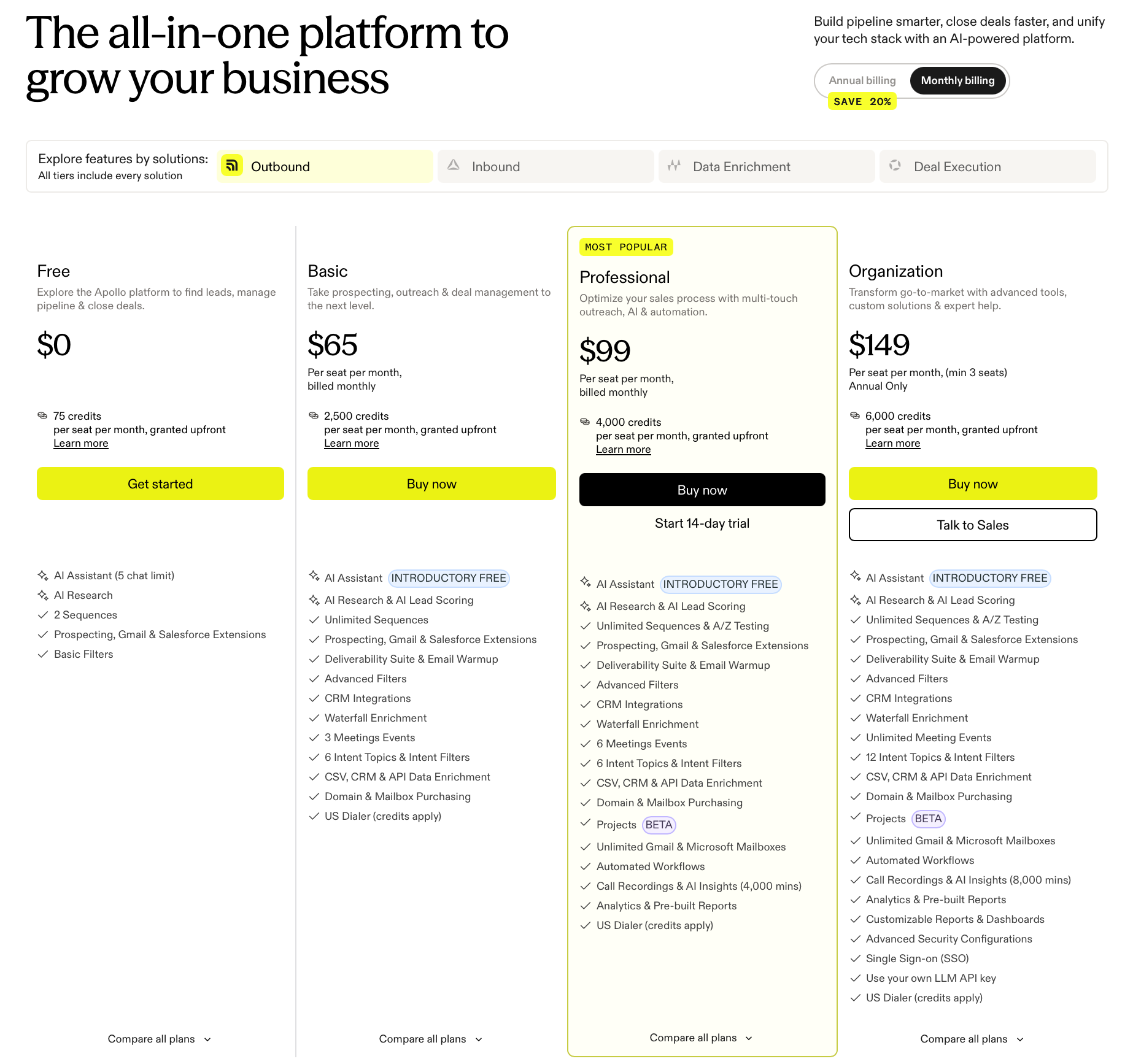
Apollo uses a per-user pricing model built around four tiers: Free, Basic, Professional, and Organization. Each plan comes with its own credit allocation, feature access, workflow limits, and reporting capabilities.
Monthly billing gives teams more flexibility, while annual billing lowers the monthly seat cost by about 20%. Companies still testing outbound volume or growth plans may prefer the shorter billing option early on.
A credit system sits at the center of Apollo’s pricing structure. Paid plans include a set number of credits that refresh according to the subscription billing cycle.
Usage also changes from one tier to another. Higher plans increase credit limits, expand workflow automation, and unlock additional reporting and admin controls.
Larger organizations should also note that the Organization tier comes with a minimum seat requirement, which raises the starting cost immediately.
Listed seat pricing only tells part of the story. Dialer usage, add-ons, extra credits, and seat growth can all affect what a team ends up spending over time. That structure gives Apollo a more flexible pricing setup than a flat monthly subscription.
Apollo positions itself as more than a contact database or outbound prospecting platform.

Plans combine several functions under one subscription structure, including:
Higher tiers expand further into workflow automation, reporting, integrations, API access, admin controls, and other parts of the sales process.
That wider product scope helps explain why pricing increases between plans. Many companies use Apollo for much more than lead generation once their outbound operations become more complex.
For larger revenue teams, Apollo starts functioning more like a comprehensive sales intelligence platform supporting the entire sales workflow, not just a standalone prospecting tool.
Apollo offers four pricing tiers built for different stages of outbound growth. The biggest differences appear in credit allocations, workflow limits, automation features, reporting, and admin controls.
Apollo’s free forever plan gives users limited access to the platform’s prospecting, enrichment, and workflow tools without requiring a paid subscription.
The free tier currently includes:
Apollo also limits record selection, exports, workflows, and enrichment usage on the free tier. Most small teams testing lead generation or outbound workflows will likely reach those limits quickly once prospecting volume increases.
The plan works best for founders, solo operators, and smaller outbound teams evaluating Apollo’s basic features before moving to a paid plan.
Apollo prices its Basic plan at $65 per seat per month. The plan includes 2,500 monthly data credits per user.
Compared to the free tier, the Basic plan opens access to more prospecting and enrichment tools designed for teams running outbound at a more consistent pace.
Key features include:
Apollo also expands access to contact data and company data enrichment tools on this tier. Teams can enrich contact details directly inside their CRM or through CSV uploads and API workflows.
The plan fits SDR setups, agencies, and smaller sales organizations with teams prospecting consistently but without heavier automation needs yet.
Apollo’s Professional plan costs $99 per seat per month. The plan includes 4,000 monthly credits per user.
The Professional tier is where Apollo starts leaning more heavily into automation, reporting, and larger-scale outbound coordination.
Key features include:
Professional also increases record selection limits, mailbox flexibility, reporting visibility, and automation capacity compared to lower-tier plans. Many sales reps use the Professional tier once prospecting volume, reporting needs, and automation start extending beyond their existing workflow setup.
The Professional tier fits prospecting teams, growing RevOps setups, agencies, and companies managing a more active sales motion with heavier prospecting, automation, and reporting needs.
Apollo’s Organization plan starts at $119 per seat per month with annual billing. Apollo’s monthly toggle lists $149 per seat, but the plan is marked as annual-only and requires at least three seats. Each user receives 72,000 annual credits granted upfront.
The organization focuses more heavily on admin control, reporting depth, and enterprise-level outbound operations.
Key features include:
Apollo positions this tier for larger outbound organizations that may require more custom pricing, governance controls, deeper reporting, and broader operational oversight through custom plans.
Most smaller sales teams likely will not need this level of infrastructure early on, especially since pricing still scales per seat instead of offering unlimited users.
Apollo credits work like usage-based currency inside the platform. Different actions consume credits depending on the type of data or activity involved.
Most sales teams use Apollo credits to access contact data, enrich records, run AI research, or place calls through the dialer. Credit consumption becomes important because it directly affects how far each plan can realistically go before additional credits are needed.
Apollo currently charges:
International dialer activity varies by region.
The credit-based system gives teams flexibility, but it also makes total operating cost harder to predict as outbound volume grows. Teams handling larger prospect lists, enrichment workflows, exports, or heavy dialer usage can burn through Apollo credits much faster than expected.
Apollo also allows users to purchase additional credits separately once plan limits are reached.
Apollo pricing starts lower on annual contracts, but the tradeoff comes down to flexibility versus long-term savings.
For example, Apollo’s Basic plan costs less per seat when billed yearly compared to monthly pricing. Professional and organizational plans follow the same structure.
Annual contracts lower the monthly rate by roughly 20%, which gives Apollo more competitive pricing for teams already running steady outbound volume.
Monthly billing gives companies more room to adjust seat count, prospecting volume, and workflow activity without locking into a larger upfront commitment. That flexibility can help early-stage outbound teams still testing hiring plans, outbound motion, or credit usage patterns.
Annual billing usually makes more sense once outbound operations become predictable. Sales teams running daily prospecting, enrichment, and recurring exports often benefit more from the lower long-term seat cost and larger upfront credit allocations.
Monthly plans may feel safer for companies still evaluating Apollo data quality, workflow fit, or total operating costs tied to exports, dialer activity, and additional credit purchases.
Actual spend depends less on the advertised seat price and more on how heavily your team uses the platform over time.
Apollo’s listed seat pricing only covers part of the total spend. Most teams end up paying more once outbound volume, automation usage, and prospecting activity start increasing.
Extra seats raise costs quickly, especially for larger SDR and RevOps setups. Higher plans also push companies toward higher annual commitments, which can become harder to reduce later if sales efforts shift.
Credit usage adds another layer of cost. Teams pulling large amounts of contact data, exports, mobile numbers, or enrichment records often burn through credits faster than expected. Once limits run out, Apollo sells additional credits separately.
Add-ons can increase pricing further. Apollo currently offers separate inbound and advanced dialer add-ons outside the standard subscription cost. International calling charges can also vary by region.
Higher-tier plans unlock more advanced features like expanded workflow limits, deeper reporting, admin permissions, and security controls. Many of those tools only become available on Professional or Organization tiers.
CRM integrations, enrichment workflows, and outbound automation can also increase operational reliance on Apollo over time.
Outdated data creates another hidden cost many teams overlook. Poor records waste credits, reduce reply rates, and slow prospecting efficiency even when using a broad range of outbound tools.
The right Apollo plan depends on how your team handles prospecting, reporting, automation, and outbound volume. Most sales teams do not need every feature listed on the pricing page right away.
The Free plan works best for testing Apollo, exploring basic sales tools, or running very light prospecting before moving into a paid tier.
Basic is usually enough for smaller teams that need contact enrichment, sequences, CRM syncing, and steady prospecting without heavier workflow automation.
Professional makes more sense for SDR teams, agencies, and outbound operators managing larger campaigns every week. Higher workflow limits, reporting tools, and automation features support a more active outbound motion once prospecting starts scaling.
Organization is designed for larger companies that need deeper reporting, admin controls, security settings, and broader oversight for multi-user operations.
Your ideal plan usually comes down to workflow complexity, prospecting volume, and how heavily your team relies on automation and enrichment. The right plan depends less on company size and more on how aggressively your team uses Apollo day to day.
Apollo is often a cost-effective all-in-one outbound platform for teams that need prospecting, enrichment, sequencing, CRM sync, and dialing in one system. It tends to deliver the most value once outbound activity is steady enough to justify the seat cost and credit usage.
However, total spend can rise quickly with heavier exports, enrichment, mobile number access, and dialer usage, so ROI depends on how much your team uses the platform day to day.
Data quality also affects deliverability and outbound efficiency. Invalid contacts, outdated records, and catch-all emails can reduce reply rates and waste credits during higher-volume prospecting campaigns.
Many prospecting teams validate data before campaigns go live to avoid unnecessary spend and deliverability issues.
Apollo can help teams build large prospect lists quickly, but outbound performance still depends on the quality of the data entering campaigns.
Invalid contacts, outdated records, and unverified catch-all emails can lead to wasted credits, unnecessary exports, lower reply rates, and email deliverability problems once outreach volume starts growing.
That becomes more expensive when teams are paying for enrichment, mobile data, dialer usage, and larger outbound workflows inside Apollo.
Listmint fits naturally into that workflow by helping outbound teams verify both standard and catch-all emails before campaigns go live.
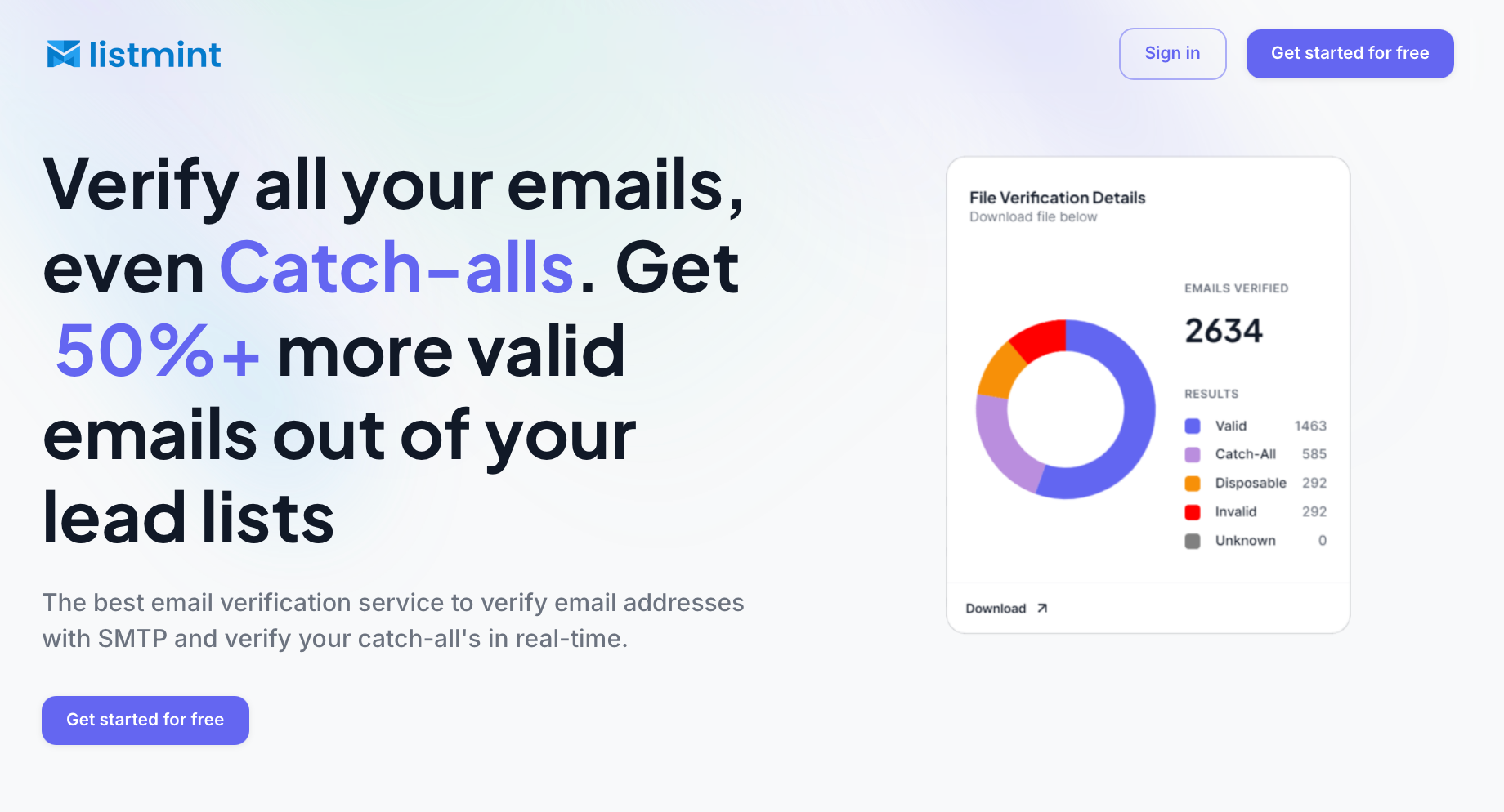
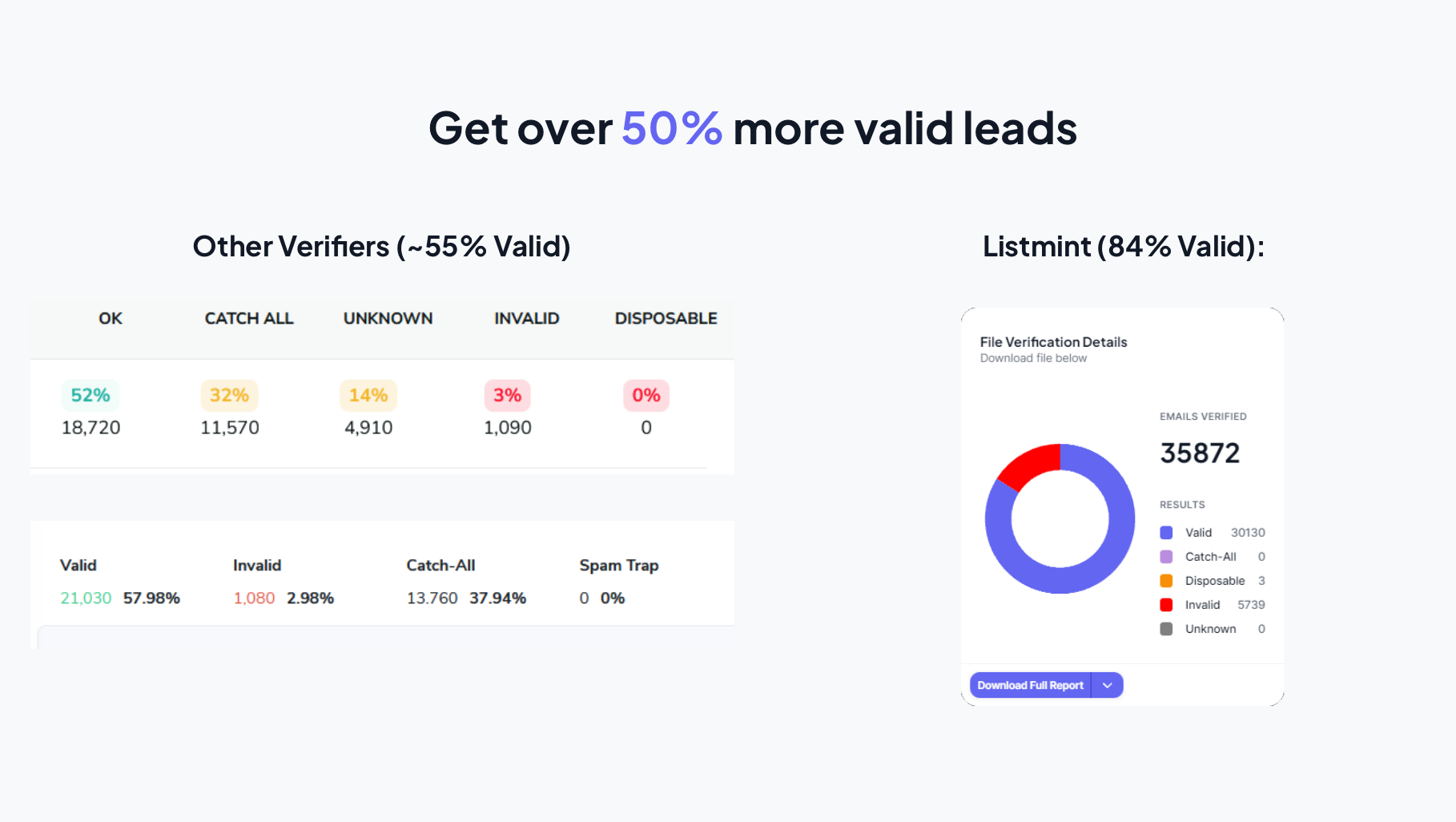
Many verification tools label catch-all emails as risky or unknown without fully validating whether the address is deliverable. Listmint takes a different approach by verifying catch-all emails in real time and classifying them as valid or invalid before campaigns go live.
That gives sales teams clearer verification results before sending campaigns and reduces uncertainty when working with larger prospect lists.
For sales teams handling larger prospect lists, that can help:
Listmint also combines SMTP verification and catch-all verification inside one platform, which helps teams avoid splitting workflows between multiple verification tools.
For companies running higher-volume outbound, cleaner verified data can become a key part of campaign performance.
Apollo’s pricing structure becomes easier to evaluate once you look beyond the starting seat cost. Credits, workflows, exports, dialer usage, and automation all influence what teams actually spend over time.
For smaller outbound setups, lower-tier plans may cover basic prospecting needs. Larger teams running heavier outreach usually need to pay closer attention to credit usage, workflow limits, and operational costs tied to scaling outbound activity.
Data quality also becomes more important as prospecting volume increases. Cleaner verified contact data can help reduce wasted credits, improve deliverability, and support more efficient outreach performance.
Listmint helps outbound teams verify both standard and catch-all emails before campaigns go live, making it easier to work with cleaner prospect data inside Apollo workflows.
Get started for free and see how much of your lead list can be verified with confidence!
Yes. Apollo allows users to purchase additional credits separately once plan limits are reached. Teams running heavier prospecting, enrichment, exports, or dialer usage often buy extra credits as outbound volume grows.
Apollo currently operates on both a newer credit-based system and an older legacy setup for some existing customers. Certain features, workflows, or parts of the user interface may only appear for accounts already migrated to the newer pricing structure.
Apollo’s standard pricing plans are intended for internal business use. Companies looking to use Apollo data inside external products, customer-facing tools, or resale offerings typically need a separate agreement and custom pricing arrangement.
Once an Apollo trial ends, users can either move into a paid subscription or continue using Apollo’s free Starter plan, which has lower credit limits and more limited feature access.
Apollo does not position email usage as fully unlimited, since sending still depends on plan limits, mailbox connections, credit usage, and outbound activity levels. Larger teams may also need stronger admin and operational oversight features on higher-tier plans, including permission management, security settings, account controls, and audit-log-style visibility.