An email list can look clean on the surface and still create deliverability problems once email campaigns start sending. Invalid email addresses, hidden catch-all domains, and outdated inboxes quietly increase bounce rates and hurt sender reputation over time.
Modern email verification methods go far beyond simple syntax checks.
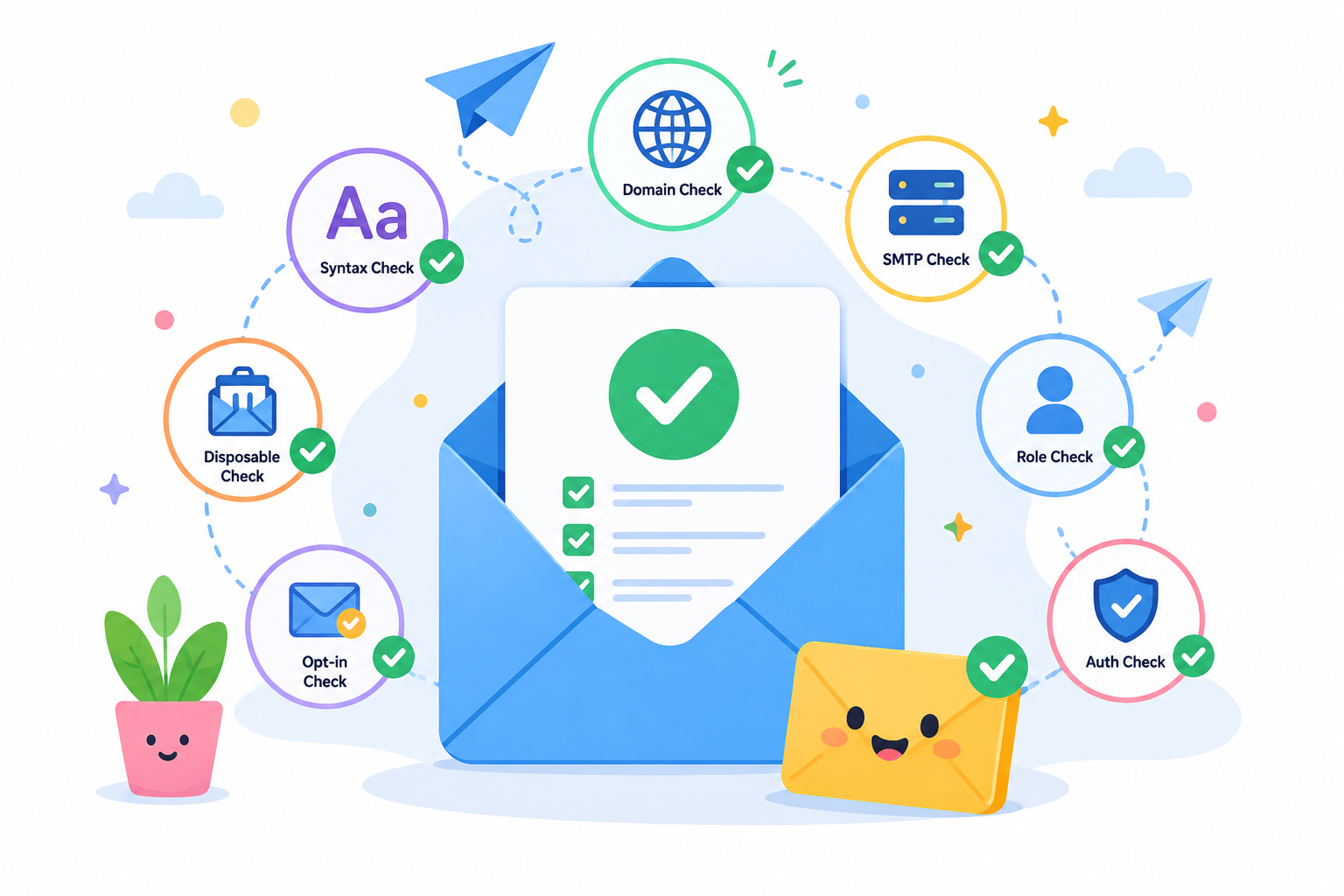
Verification systems now combine multiple layers, like Domain Name System (DNS) lookups, Simple Mail Transfer Protocol (SMTP) verification, and mailbox analysis to help outbound teams reduce risk before sending.
This guide breaks down the 7 core verification methods used to protect your data, why modern verification has become more difficult, and how your team can choose the right workflow to maintain healthy inbox placement.
A correctly formatted email address is not always a safe address to send to.
Syntax validation checks the @ symbol, domain formatting, and other structural rules, but delivery problems can still appear later in the process.
DNS and Mail Exchange (MX) checks take verification a step further by confirming that the domain is valid and configured to receive email.
They can confirm the mail server exists, but they cannot tell you whether the actual inbox behind the address is active.
SMTP verification attempts mailbox-level analysis by pinging the recipient server. Even then, no single method can fully validate an email address with complete certainty.
A smarter email verification process combines multiple signals to help outbound teams identify more reliable and deliverable addresses.
Modern email providers protect users more aggressively now, which makes email validation less predictable than it used to be.
Single-layer list cleaning cannot keep up with these defenses, resulting in severe negative consequences for your outbound campaigns.
When you send to unverified catch-alls or masked invalids, it directly affects email deliverability. High bounce rates signal to providers that you are a spammer, weakening your sender reputation and landing your emails in the junk folder.
Modern outbound teams use layered analysis to bypass these security traps, protect their sending domains, and ensure messages actually reach the intended recipients.
The modern email verification process relies on multiple systems working together instead of a single validation check. Each method solves a different problem, from formatting issues and domain validation to mailbox availability and sender trust.
Syntax validation acts as the first filter in the verification process. It scans the structure of an email address against standard internet formatting rules before deeper checks begin.
A standard email format check catches formatting issues that often slip into sign-up forms and outbound lists, including missing @ symbols, broken domain structures, invalid characters, and other syntax errors that can trigger delivery failures.
It also helps catch typo-related mistakes early, such as gmial.com or incomplete domains that would immediately fail delivery. Outbound teams often run a quick syntax check or use a free email checker during form submissions or list uploads to stop obviously broken data from entering outbound workflows.
Syntax validation can verify email addresses for structural problems, but it cannot confirm whether the inbox behind the address is active or able to receive messages.
Fake inboxes, abandoned accounts, and other properly formatted addresses can still pass these early checks before deeper verification begins.
Formatting checks mean nothing if the underlying email domain does not exist. Domain verification solves that problem through quick DNS lookups that confirm whether a domain is registered and currently active.
Once domain existence is confirmed, verification systems perform MX record validation. Mail exchange records act like routing instructions for incoming email traffic. They point to the specific email server responsible for receiving messages for that business.
Without active MX records, email delivery usually breaks before the message even reaches the inbox.
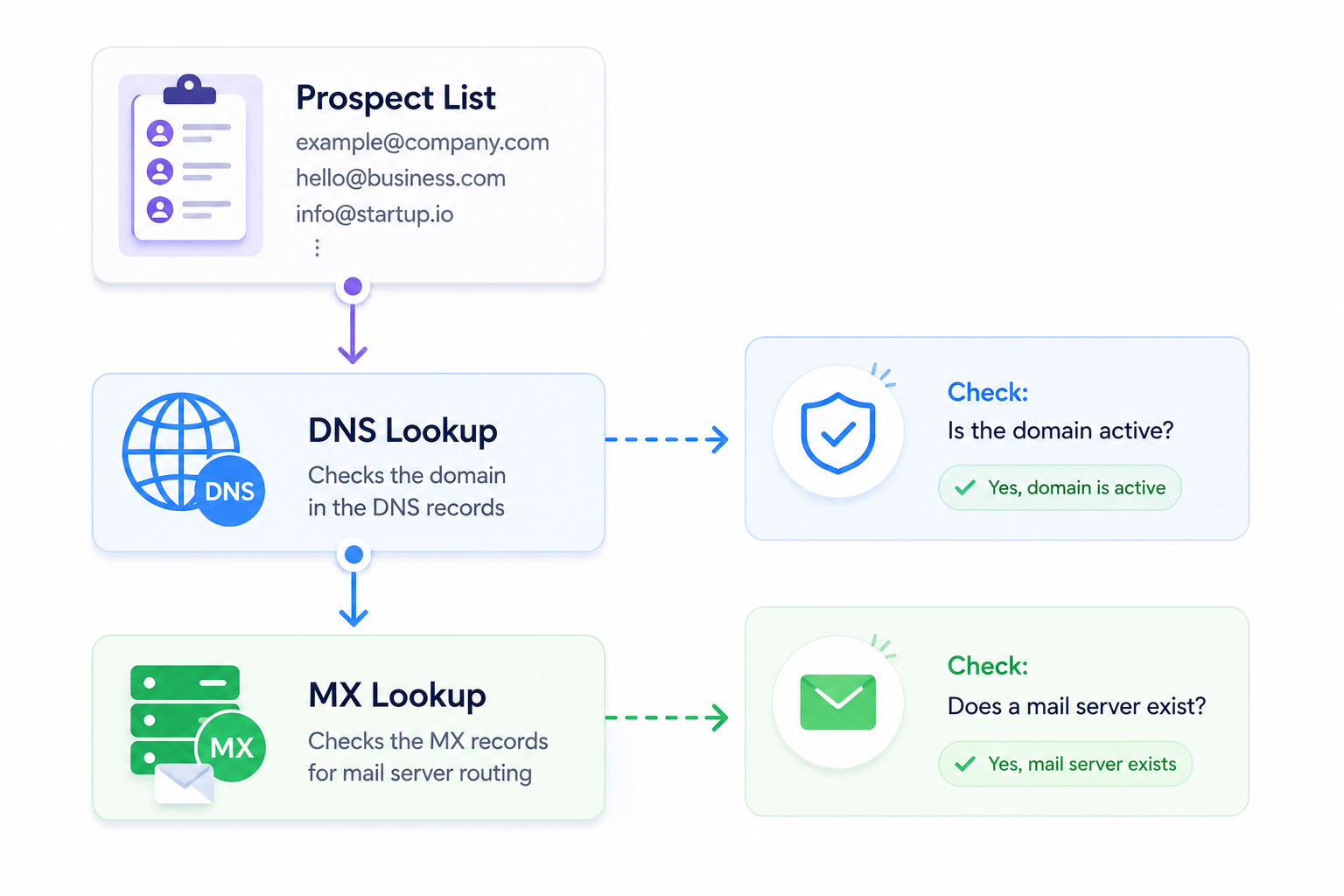
Checking SMTP server configuration helps filter out expired websites, fake businesses, and broken domains early in the process. However, infrastructure checks alone cannot confirm whether the actual contact behind the address is active.
A company can have healthy MX routing while the employee assigned to the inbox has already left the business.
Domain checks only confirm that the email infrastructure exists. They do not guarantee that the specific email address exists or can safely receive messages.
SMTP verification is one of the deepest layers used to verify email activity before email campaigns go live. It works through an SMTP handshake that connects directly to the receiving mail server to test the status of a recipient's inbox.
During the check, the verifier uses the RCPT TO command to point directly to the targeted recipient address. A successful response suggests the mailbox may be active without sending an actual message.
Running an SMTP check provides real-time verification that helps outbound teams validate addresses before launching campaigns.
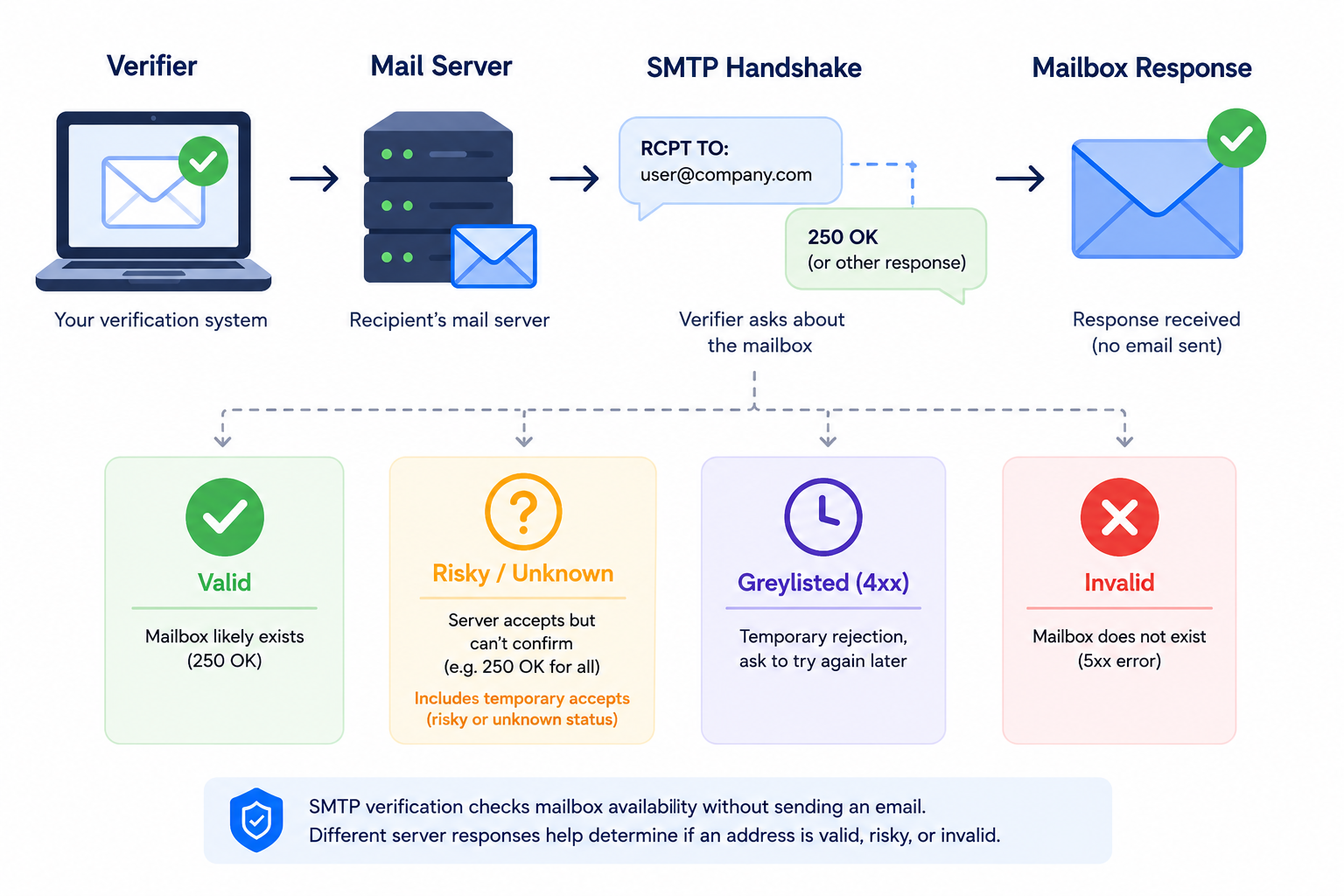
Modern server defenses make reliable verification harder today. Security systems use anti-harvesting protections to intentionally hide mailbox status from automated requests.
Greylisting tactics temporarily reject unknown connections, demanding a retry that standard checkers often skip. Corporate systems can also provide temporary acceptance, saying yes to the handshake but throwing an error after deeper internal scanning.
Leaving these blind spots unaddressed directly triggers high bounce rates and severe deliverability issues. Outbound teams must recognize that a single ping cannot bypass these advanced corporate blockers.
Safe sending practices require layered data analysis to look beyond the initial handshake response and prevent undeliverable emails from damaging sender reputation.
Use this deep mailbox verification routine alongside infrastructure checks to accurately verify email lists and check email addresses before launching a campaign.
Catch-all verification is an email verification method used to analyze domains configured to accept incoming messages for every possible inbox tied to that domain, even if the actual user does not exist.
Basic verification tools often run into problems with accept-all domains because the server may return a positive SMTP response even when the real email account behind the address is inactive or unreachable.
Because basic server responses can be misleading, advanced verification systems rely on additional delivery signals, including:
This deeper verification process helps outbound teams classify catch-all email addresses into categories like catch_all_valid or catch_all_invalid instead of treating every result as an unknown risk.
More reliable catch-all verification helps teams reduce bounce rates, keep valuable leads from getting discarded, and focus list cleaning on contacts that are actually unsafe to use.
Sign up for a free account and get 50%+ more valid emails out of your lead lists with Listmint.
A disposable email address is a temporary inbox designed to expire after a short period of time. Prospects sometimes use these addresses to access gated content, sign up for free trials, or download resources without sharing a real business email.
For outbound teams, these inboxes create list quality problems almost immediately and can weaken long-term marketing efforts tied to email engagement and deliverability.
Fake sign-ups and short-lived accounts rarely turn into real pipeline opportunities. They usually end up as bounced emails, inactive contacts, or spam complaints later in the outreach process.
Verification systems detect these addresses by comparing incoming domains against frequently updated databases of known disposable email providers. SaaS growth teams often run these checks during sign-up verification to stop low-quality leads from entering CRM systems in the first place.
Disposable inboxes can also look completely valid during early verification because the domain and server remain active temporarily. That creates hidden deliverability risks once the inbox expires or disappears later.
Adding disposable email detection into your list cleaning workflow acts as an important layer of fraud prevention. These security measures help marketers maintain cleaner databases, protect sender reputation, and keep outbound campaigns focused on legitimate business contacts.
Role-based addresses connect to a department or business function instead of a single employee. Common examples include info@, support@, admin@, and sales@.
These inboxes create challenges for outbound teams because multiple employees often manage the same address.
One person may open the message, another may reply, and someone else may report it as spam. That weakens personalization and makes engagement patterns harder to measure accurately.
Email marketers often remove role-based contacts during list cleaning because these inboxes tend to generate lower reply quality and higher spam complaints during cold outreach.
Shared inbox activity can also distort campaign analytics when automated routing systems or several employees interact with the same email thread.
Verification systems flag these patterns early so sales teams can separate shared inboxes from direct decision-maker contacts before launching campaigns.
Role-based detection does not automatically mean the address is unusable. Procurement, support, and operations departments often rely on these inboxes for legitimate communication. Third-party services simply classify them differently because they behave differently from person-to-person business emails.
Single and double opt-in verification help confirm that a real person controls the submitted inbox before future messages are sent.
Unlike technical checks like DNS or SMTP verification, opt-in methods rely on direct user action after someone enters an address into your online forms.
Single opt-in adds a contact directly into the database immediately after the user submits a form. Outbound teams and SaaS growth teams often use this approach to reduce friction during free account sign-ups, newsletter registrations, and lead capture workflows.
The process is faster, though it also allows typo-filled submissions, fake sign-ups, and temporary inboxes to enter the system more easily if no additional verification layers exist behind the form.
Double opt-in adds an extra confirmation step before the contact becomes active. After signing up, the user receives a verification email and must click a confirmation link to prove inbox ownership.
Email marketers often prefer double opt-in because it improves list quality, reduces spam complaints, and creates stronger engagement signals early in the customer journey.
Single opt-in prioritizes faster growth. Double opt-in prioritizes cleaner databases, stronger deliverability, and more reliable contacts for teams using a real-time API or free email checker during sign-up verification.
Email verification and email authentication solve two different problems, though outbound teams often group them together.
Email verification checks whether an address is real, active, and safe to contact. Email authentication proves the sending domain is authorized to send messages.
Verification protects list quality. Authentication protects sender identity and domain trust.
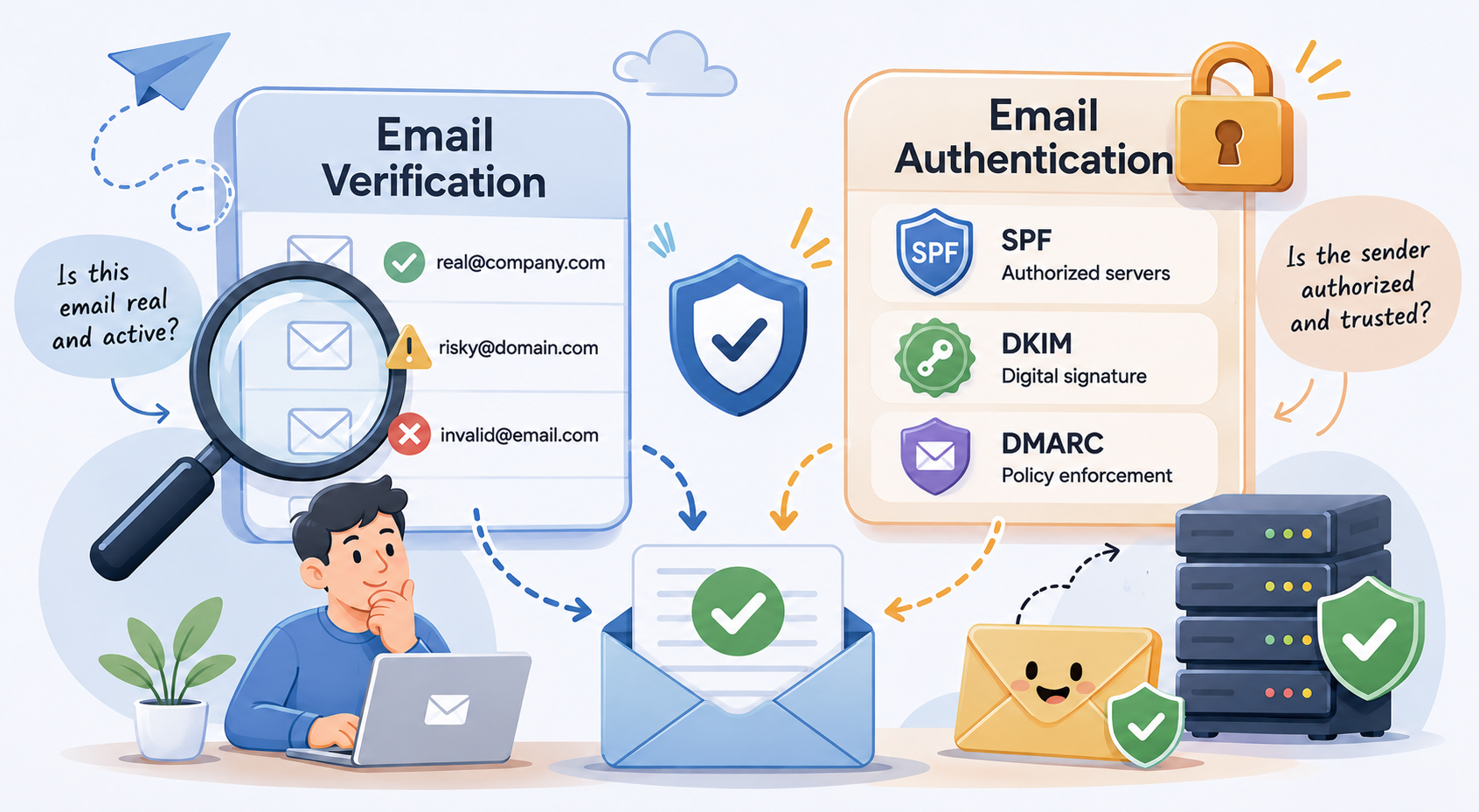
Outbound campaigns need both to work together. Clean contact data reduces bounce rates, while proper email authentication helps email providers trust incoming messages and improve inbox placement.
A verified contact list cannot fully protect the sender's reputation if the domain lacks authentication records. In the same way, SPF, DKIM, and DMARC cannot prevent deliverability problems caused by invalid or risky email addresses.
SPF is an email authentication method that identifies which mail servers and IP addresses are authorized to send messages from your domain.
When a message reaches the receiving server, the provider checks the SPF record to confirm the sending server is approved. Failed checks can push messages into the spam folder or block delivery completely.
SPF helps outbound teams reduce spoofing risks and improve trust with email providers during cold outreach and high-volume email campaigns.
DKIM adds a secure email signature to outgoing email messages. Receiving servers use that signature to confirm the content was not altered after the message left your domain.
Successful DKIM validation improves email security and helps providers separate legitimate outreach from unsolicited emails or spoofed traffic.
Strong DKIM configuration also supports compliance with modern sender requirements and CAN-SPAM Act expectations.
DMARC helps receiving mail servers decide what to do with messages that fail authentication checks tied to SPF or DKIM.
A DMARC policy tells receiving servers how to monitor, quarantine, or reject suspicious traffic. It also gives outbound teams visibility into authentication failures and spoofing attempts.
SPF, DKIM, and DMARC improve inbox placement, sender trust, and long-term deliverability. They help legitimate campaigns avoid the spam folder.
They do not verify whether the recipient's inbox actually exists.
That distinction is important for outbound teams. Authentication protects the domain's reputation. Email verification protects list quality. Healthy deliverability depends on both working together consistently.
Listmint is an email verification service built for outbound teams that need more than basic SMTP checks.
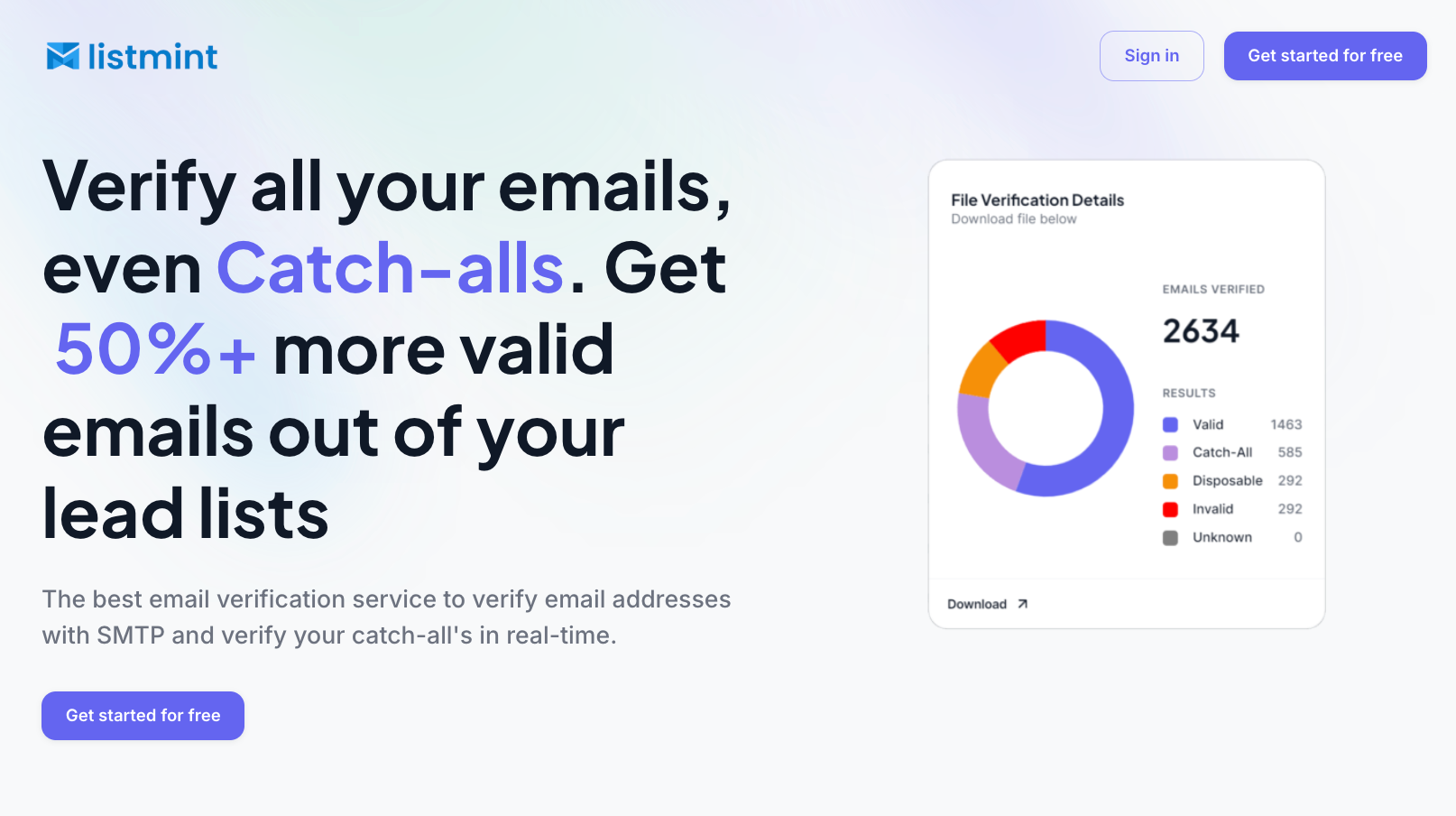
It verifies both standard email addresses and catch-all emails in real time, helping sales teams recover leads that traditional verification systems usually label as risky or unknown.
A large portion of B2B lead lists contains catch-all domains. Standard verification providers often stop at labeling those records as “risky,” which forces outbound teams to either ignore them or gamble on deliverability.
Listmint takes an extra verification step to classify those addresses as catch_all_valid or catch_all_invalid without sending manual verification emails or waiting 48 hours for results.
That changes how teams handle catch-all verification completely. Verified catch-all emails can be treated like other valid business contacts instead of getting isolated into risky sending segments.
Why outbound teams use Listmint:
Listmint reports over 99% SMTP verification accuracy and 99%+ catch-all verification accuracy with more than 1 billion emails verified through the platform.
Outbound agencies and SaaS growth teams also use Listmint to simplify list cleaning at scale. Standard SMTP verification and catch-all verification run inside the same workflow, which removes the need for separate verification systems and manual review processes.
Start verifying more valid emails with Listmint!
The right verification workflow depends on how your team collects and uses email data. A sign-up form, outbound prospect list, and marketing database all create different deliverability risks, so the verification process should match the actual use case.
Large outbound lists and older databases benefit from batch verification because hidden invalids and stale contacts tend to pile up over time. Cleaning that data carefully helps teams avoid bounce spikes once outreach starts.
A layered process that combines syntax checks, DNS validation, SMTP analysis, and catch-all verification helps outbound teams catch problems before campaigns start sending. Regular verification also keeps databases healthier over time and helps protect sender reputation.
Teams handling large prospect lists often use an email verifier like Listmint to simplify email list cleaning and improve sender score, especially when working with difficult catch-all domains or Google Sheets exports.
Recover more valid leads and reduce bounce risk with Listmint today!
Real-time verification works best during form submissions, free trials, and account registrations.
The focus here is speed. Slow checks create friction and reduce conversions, so outbound and SaaS growth teams usually combine syntax validation, disposable email detection, and SMTP analysis through an email verification API.
Running verification at the point of capture helps block fake sign-ups, typo-filled submissions, and temporary inboxes before they enter CRM systems.
Email marketing workflows depend on both clean contact data and proper email authentication.
SPF, DKIM, and DMARC help providers trust incoming messages, while regular email hygiene reduces bounce rates and spam complaints tied to outdated contacts.
Strong deliverability usually comes from maintaining both sender reputation and healthy list quality consistently over time.
Large organizations often manage several sending domains, internal systems, and verification workflows at the same time.
Enterprise verification processes usually combine identity intelligence, custom routing rules, AI analysis, and internal security controls to manage verification at scale.
Teams handling high-volume outbound or content marketing operations often build custom workflows that separate internal traffic, external contacts, and customer-facing communication channels.
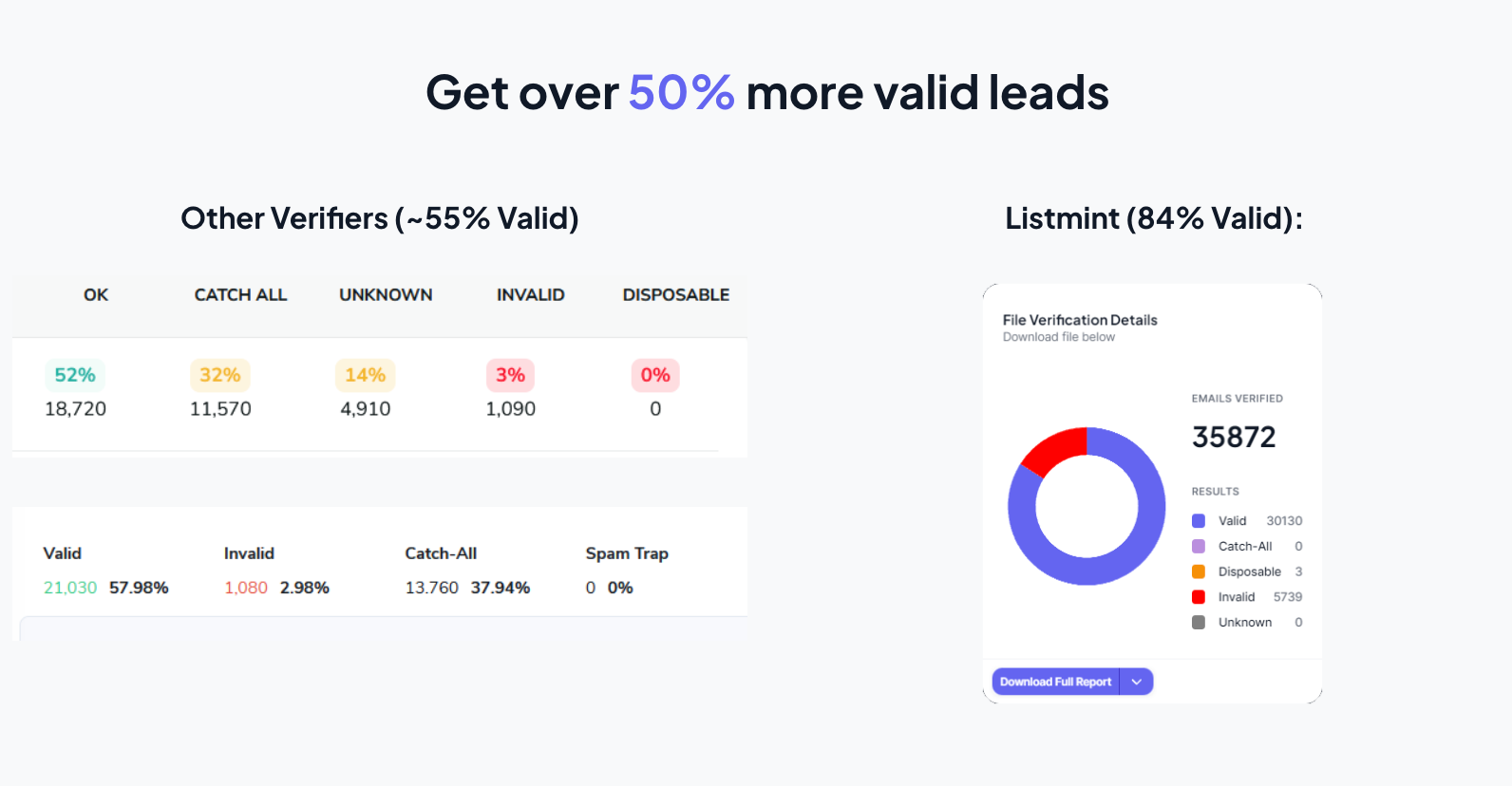
Modern email verification requires more than basic formatting checks.
Outbound teams need reliable ways to identify risky addresses, protect sender reputation, and keep campaigns reaching real business contacts.
Listmint helps teams verify both standard and catch-all emails in real time, so valid leads do not get discarded as “risky” or “unknown” without deeper analysis.
That gives sales teams a faster and more reliable way to clean lists, reduce wasted lead data, and improve outbound performance without adding extra manual work.
Get started for free and verify more of your lead list with confidence!
Email verification breaks down into two core execution formats:
Both formats use a multi-tiered sequence of syntax, DNS, and SMTP handshake checks to ensure addresses are valid.
Email looping is a routing problem where a message gets stuck bouncing endlessly between mail servers instead of reaching the intended inbox. Circular forwarding rules, auto-replies, or server misconfigurations usually cause the issue.
“++” often refers to a retry or tracking counter that increases every time the message gets rerouted. Once the message exceeds a safe limit, the mail server automatically stops it to prevent delivery failures or server overload.
The 5 C’s are simple principles that help teams write clearer and more professional emails:
Following these principles helps business emails stay easy to understand, professional, and more effective for both internal communication and outbound outreach.
The ideal tool depends on your specific business focus. For standard marketing campaigns, legacy bulk platforms provide simple list cleaning. However, for B2B outbound teams, sales agencies, and SaaS platforms that need to handle complex business addresses, Listmint stands out as a premier email verification service. It provides deep, real-time catch-all domain resolution to recover valid email addresses that other tools throw away.