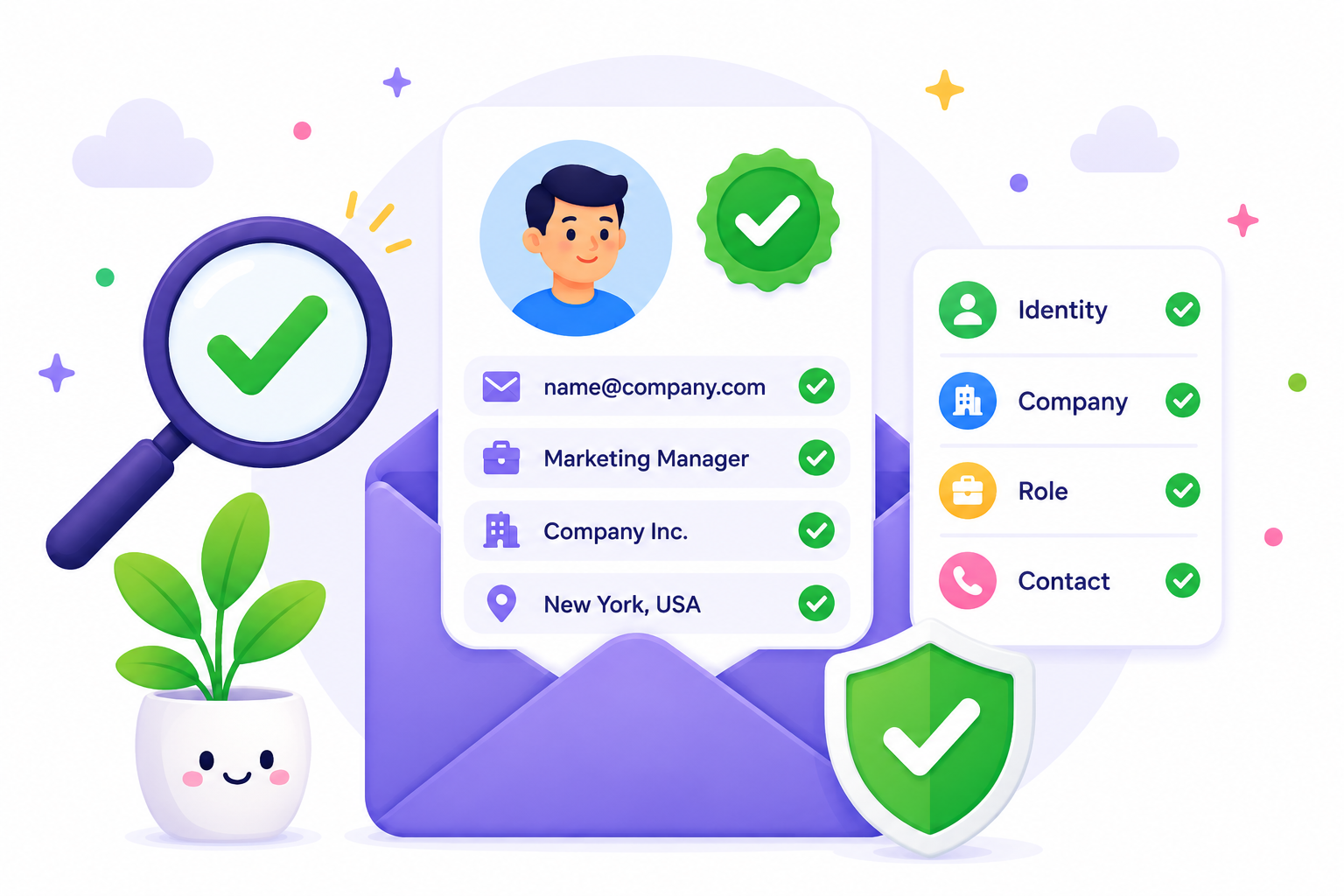
A lead lands in your CRM with a name, company, job title, and contact details. It looks complete, so it may seem ready for outreach.
But appearances can be misleading.
The person may have changed jobs. The information may be months old. A form could contain fake details, or the record could be a duplicate hiding among thousands of contacts. Even a polished-looking database can contain bad data.
Before your team uses any of it, one question comes first: Is this record actually reliable?
This guide explains how to verify leads before sales and outreach, why lead verification matters, and how to spot records that need another look before use.
Lead verification is the process of checking if the information attached to a lead is legitimate, accurate, current, consistent, and usable.
It helps you determine if your lead records contain information your team can reasonably rely on before putting them to work.
Depending on the record, that information may include the person's identity, company, job details, email address, phone number, lead source, and other contact details.
Freshness also affects data accuracy because information that was correct when collected may no longer reflect the person today.
Maintaining data quality starts with knowing which records still hold up and which ones need another look. A complete record is only useful if the information behind it remains dependable.
A valid lead, however, is not automatically a qualified prospect. You might verify that someone genuinely works for the company listed in your database but find that the business falls outside your ideal customer profile.
Lead verification checks the record. Lead qualification evaluates the sales opportunity. That distinction also explains why verified contacts can still become unqualified leads based on your sales criteria.
So, how do you know if a lead is actually ready to use? Below are the key checks to include in your lead verification process to help you separate questionable records from reliable data before outreach.
Start with the source of the record. Incoming leads can come from demo requests, events, referrals, prospecting databases, third-party lists, manually researched contacts, or older CRM data.
For website leads, look at the page and context behind the form submission.
What a user fills out on one of your landing-page forms gives you different context from a record purchased from a data provider. The same applies to contacts collected through other lead generation channels.
Where a lead came from can tell you a lot about the record, but it cannot confirm that the lead itself is legitimate.
Incomplete submissions or questionable information submitted through a form may signal that further review is needed for possible fraudulent leads.
Recording the source and collection date gives your team useful context for the rest of the verification process.
Next, look at the record itself for problems you can spot without deeper research.
Start with the basic contact details. Missing names, malformed email addresses, placeholder phone numbers, obvious spelling mistakes, and fields filled with values such as “test” or “N/A” are immediate warning signs.
Formatting can reveal problems too. A company name entered in the phone field, or a string of random characters in the job-title field, suggests the record needs attention.
These checks help you validate data at a basic level before spending time on deeper verification, either manually or through a lead verification system. They can also separate obviously invalid leads from unverified leads that simply need more checking.
Not every incomplete record is automatically one of your low-quality leads, but obvious errors are a good reason to stop and review it before outreach.
Once the record passes the basic review, confirm that the person and company appear to be real and connected.
Look for a legitimate company presence and reliable business or professional information showing that the person is associated with the organization listed in the record.
Depending on the information your business uses, relevant data points might include:
A manual review can be useful when the available information is limited or conflicting.
At this stage, you are simply confirming that you are dealing with real prospects. You are not deciding if they are high-quality prospects for your sales team. Someone can be a real person at a legitimate company without being interested in what you offer.
Confirming the person and company helps you separate genuine prospects from records built on false, outdated, or mismatched information.
A real person at a real company can still have outdated professional information.
Check the job title, department or function, current employer, business location where relevant, and any other professional details your sales team plans to rely on.
Someone listed as a marketing director, for example, may have moved into a different role or left the company since the record was collected.
Keep this check focused on currency, not sales fit. A current job title doesn't tell you whether the person has buying authority or should become one of your qualified leads.
Accurate professional information improves lead quality at the record level because your team works from details that reflect the contact today.
Next, compare the company listed in the record with its official website and domain.
The domain should correspond with the organization the lead claims to work for. Look for misspellings, extra characters, unusual domain variations, or a work email using a completely unrelated domain.
For example, a lead may list examplecompany.com as its employer's website but provide an email address using an unrelated business domain. That discrepancy deserves another look.
At this stage, you are confirming that the domain belongs to the expected organization. You are not checking if the individual mailbox exists or can receive email.
A legitimate person, real company, and matching domain still do not prove that the individual mailbox is usable. The employee may have left, the address may no longer exist, or the mail system may make the result difficult to confirm.
That is where email validation adds another layer to the lead record.
Lead verification software with email-checking capabilities can evaluate technical signals and provide verification results that help your team distinguish usable addresses from invalid, risky, disposable, catch-all, or uncertain ones.
The verification status then helps your team decide how to handle that email before outreach. An uncertain address, for example, should not be treated the same way as one confirmed as usable.
The broader lead may still be legitimate even if its email is not suitable for receiving messages.
Get started for free with Listmint and verify emails with 99%+ accuracy in real time.
If your team plans to contact the lead by phone, that number deserves its own check.
Basic phone number verification can confirm that the number follows the expected format and includes the correct country code. More complete phone verification may also help determine if the number appears active or reachable.
For workflows that require proof that someone can access a number, SMS verification may send an OTP verification code. Entering the one-time password confirms access to that number at the time of the check, but it does not independently prove the person's identity or long-term reachability.
That level of verification is not necessary for every lead workflow. If your email campaign uses email only, there may be little reason to validate a phone number you do not plan to use.
Individual fields can look reasonable on their own and still form a questionable record when you put them together.
Compare the findings from the checks you have already completed. Does the email domain correspond with the company? Does the employer align with the professional information? Do the person, company, business location, and domain make sense together?
A lead claiming to work for one company but using another company's domain is an obvious example. Smaller contradictions may require a closer look with the right tools or another reliable source.
Cross-checking can make all the difference between data that merely looks complete and information your team can confidently act on. A data-driven approach to effective targeting still depends on the underlying record being internally consistent.
Now look at the lead in the context of your existing database.
The same person may appear twice under different email addresses, or two lead records may contain conflicting versions of the same contact. An older entry might also remain in your CRM after you add a newer version.
Time creates another problem. A record with good data quality when it entered your database can become stale after a job change, company move, or a long period without use.
Finding these records helps keep your database useful without repeating all the individual checks you have already completed.
Removing duplicate and unnecessary records can help avoid wasting resources and reduce costs associated with maintaining your database. Cleaner lead data can also support efforts to maximize ROI, although verification alone does not determine campaign results.
At this point, the question is not how old every field is. It is whether the version stored in your database is still the one your team should use.
Once the checks are complete, turn the findings into a practical lead validation decision. Your team can use a simple internal status to decide what should happen next.
A Ready status means the record has passed the checks your workflow requires. It does not turn the contact into one of your high-quality leads, prove they are genuinely interested, or guarantee higher conversion rates.
The same distinction applies to downstream results. Verified records can support cleaner outreach decisions, but they do not automatically create paying customers, improve conversion rates, or guarantee sales growth.
Ready for outreach does not automatically mean qualified for sales.
Lead verification is worth revisiting whenever contact data is about to be used. A record may have been accurate when it entered your database, but job changes, company moves, and outdated contact details can make that information less dependable over time.
Common points to verify leads include:
A simple rule is to verify lead data whenever it is about to move from storage or collection into a workflow where your team plans to act on it.
Lead verification and email verification are related, but they do different jobs. Lead verification looks at the broader record, including the person's identity, company, professional details, other contact details, and how well those pieces fit together.
Email verification focuses specifically on the email address attached to that record. A lead can have accurate company and professional information but still have an invalid or outdated mailbox.
The reverse can also happen: a working email address does not prove that every other detail in the lead record is accurate. That makes email verification one part of the broader lead verification process, not a replacement for it.
A lead list can contain legitimate prospects whose email addresses are still difficult to verify. Listmint helps you check those addresses before outreach, including catch-all emails that standard email verification often leave unresolved or classify as risky.
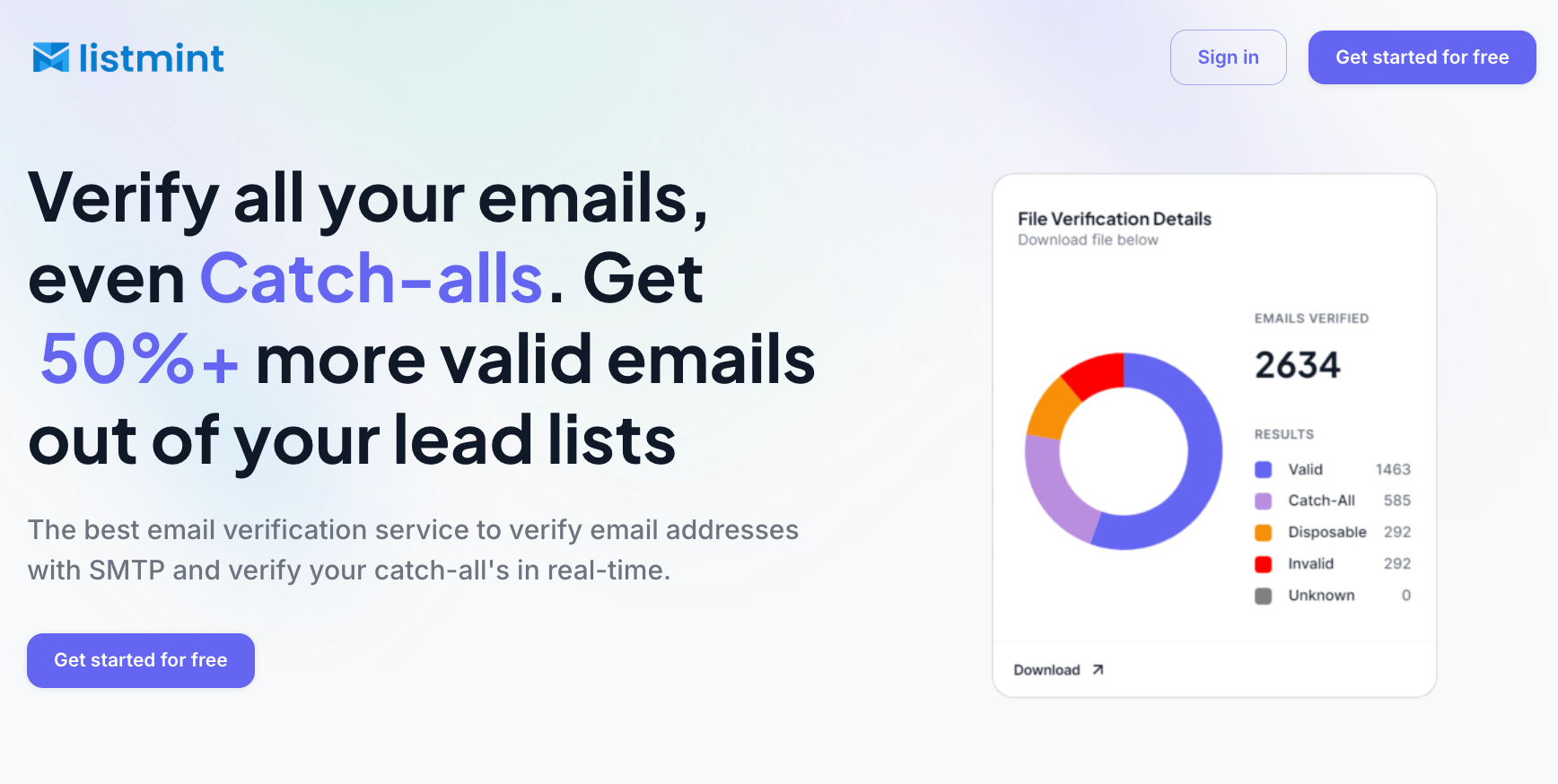
Listmint combines standard SMTP and catch-all verification in the same platform. It takes catch-all checks further and returns catch_all_valid or catch_all_invalid, giving your team a more usable result for those addresses.
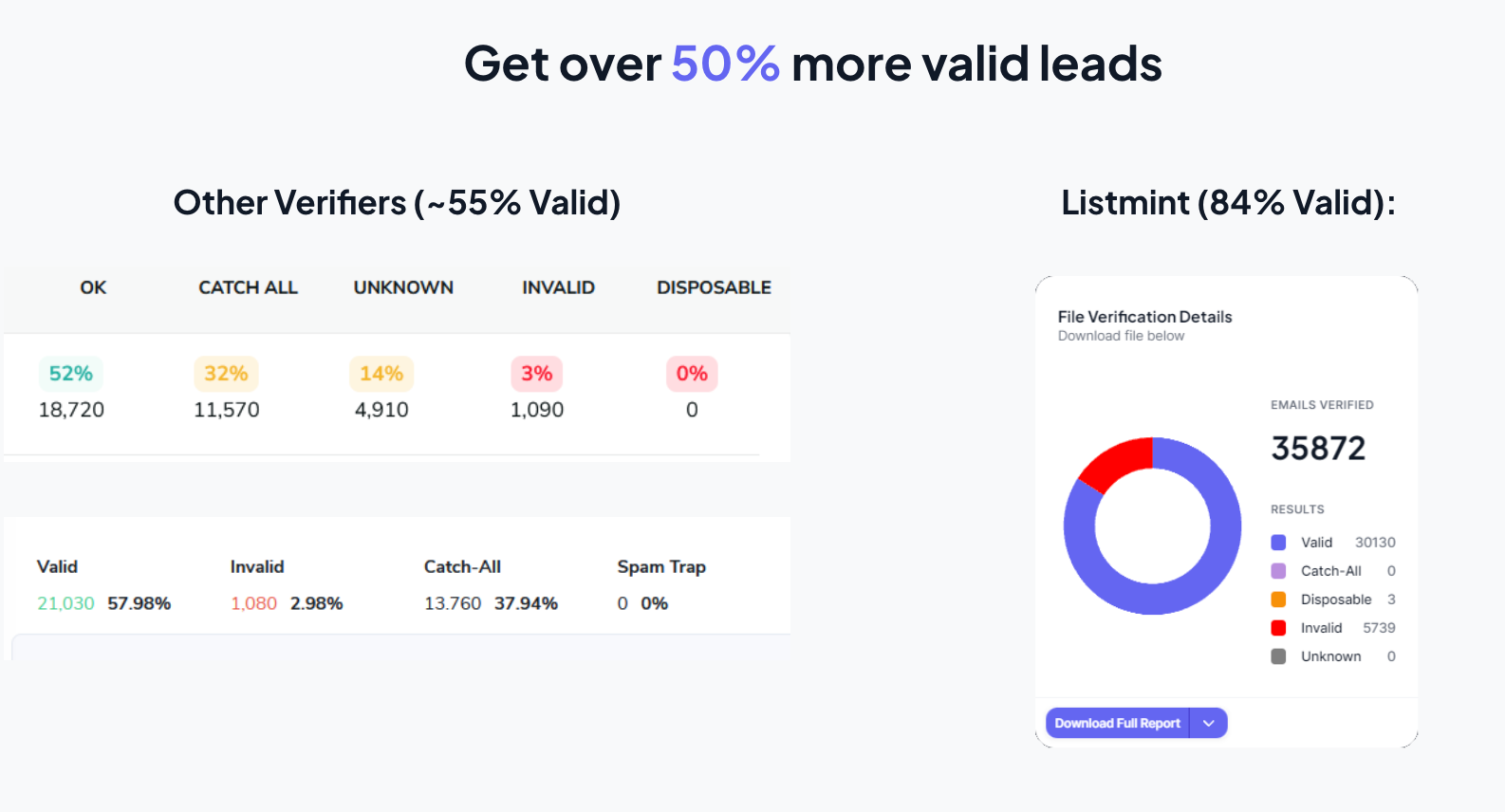
Listmint has verified more than 1 billion emails with 99%+ SMTP and catch-all verification accuracy. Unlike generic verifiers that return about 55% valid results, Listmint provides 84% valid results, helping identify more usable addresses from an existing lead list.
For different lead workflows, Listmint supports:
The email verification API also provides real-time validation for standard and catch-all addresses, making it useful for businesses that want to add email verification to their own products or services.
Verify the email addresses attached to your leads with Listmint. Get started for free.
A lead can look ready for outreach long before the information behind it is ready to use. Checking the record first gives your team a better idea of what can be used, what needs updating, and what should be left out.
Email is one part of that process. Listmint helps you verify the email addresses attached to your leads, including catch-all addresses that may otherwise remain unresolved.
Once the rest of the lead record has been reviewed, you can use Listmint to check the email field before it enters your outreach workflow.
Ready to check the email addresses in your lead list? Get started for free with Listmint.
Four common methods are identity verification, company and professional verification, contact verification, and cross-checking the full record for inconsistencies. The exact checks depend on the information your team plans to use before outreach.
ChatGPT can assist with lead research when it has access to relevant public information, supplied data, or connected tools. However, using ChatGPT to find contact information does not automatically generate verified leads. The resulting data still needs to be checked for accuracy, freshness, and usability.
A lead is typically identified through information that connects a person or business to a potential sales opportunity, such as a name, company, role, source, and contact details. Identifying the record is separate from verifying that those details are accurate and current.
Genuine leads start with reliable sources, but the source alone is not enough. Check that the person, company, professional information, and contact details line up and are still current. Before contacting them, consider the legal compliance rules that apply, any proper consent requirements, and possible compliance risks related to how the lead data was obtained and used.
Lead verification helps your team spot inaccurate or outdated information before it reaches your outreach. That means fewer messages sent using the wrong details and fewer avoidable interactions that could frustrate prospects or hurt your brand reputation.