At first glance, alex@company.com and random5892@company.com look like ordinary email addresses. But one may belong to a real employee, while the other may belong to nobody.
If the domain uses a catch-all setup, both can appear accepted during an initial check. That can make it difficult to confirm whether an email address exists for the specific recipient address.
A catch-all verifier can help evaluate the individual address when the answer remains uncertain.
This guide walks through each catch-all email example and shows how catch-all addresses differ from regular email addresses.
A catch-all email looks like a regular email address. There is no special prefix, suffix, symbol, or naming pattern that identifies it as a catch-all.
Here are a few examples.
Each recipient address follows the same familiar format with a name or alias followed by an @ symbol and an email domain.
The difference comes from the domain’s catch-all configuration, not from anything visible in the address itself. Catch-all email addresses can use personal names, department names, or other naming patterns commonly found in regular email accounts.
Because the catch-all behavior is not visible in the address itself, there is no visual feature you can rely on to identify one.
Catch-all behavior can show up in very different situations. An address might belong to a current employee, contain a typo, or simply look believable even though nobody uses it.
The examples below show why the situation behind the address is just as important as the way it looks.
Consider alex@company.com.
Imagine Alex works in sales at the company and uses this email every day to speak with customers. His mailbox is active, and the address belongs to an actual person.
The company also happens to use catch-all handling for its domain. That does not change the fact that Alex has a genuine mailbox.
In other words, an address can sit on a catch-all domain and still be a valid address for a real person. In Alex's case, the address exists and is actively used.
Catch-all does not automatically mean invalid.
Correct: support@company.com
Mistyped: suport@company.com
Now imagine a customer wants to contact support but leaves out one of the p's in the address.
The intended mailbox is support@company.com, but the customer sends the message to suport@company.com.
That incorrect email address may not correspond to a mailbox the company actually created. On a catch-all domain, however, the typo may not receive the immediate rejection you might expect.
For someone handling incoming emails, that can make incorrect addresses less obvious at first. The same uncertainty can apply to incoming mail sent to other recipients with misspelled names.
The important detail here is the typo. A domain appearing willing to accept the address does not mean the recipient name was entered correctly.
Consider random5892@company.com, an address that nobody at the company has ever used.
No employee owns that mailbox. However, the receiving mail server may initially accept a recipient check for it.
Even if the server accepts the check, that does not prove that random5892 has an individual mailbox behind it. The address may still be one of the domain’s nonexistent addresses.
In this case, the server response tells you how the domain handles unknown recipients, but it does not confirm whether that specific mailbox exists.
That is why SMTP verification alone may not resolve an address when the domain responds the same way to recognized and unrecognized recipients.
David Jackson worked for XYZ two years ago and used david.jackson@xyz.com as his work email.
At the time, it was connected to an active mailbox. David has since left the business, and his old mailbox may have been removed even though the address still looks like a current employee email.
That history is what makes inactive catch-all addresses different from obviously fabricated addresses. An address can look legitimate because it genuinely was legitimate at one point.
Old catch-all email accounts can also appear in contact data prepared for future campaigns. Their professional appearance does not tell you if the original mailbox is still active today.
If the mailbox has been removed, messages sent to the old address may eventually produce bounce messages or another undeliverable email outcome, depending on how the domain handles it.
Take partnerships@company.com. It sounds like a real department address, especially when businesses commonly use emails such as:
It would be easy to assume that partnerships@company.com belongs to an actual team. In reality, the company may never have created that specific mailbox.
With a catch-all inbox, messages sent to an unrecognized department name may still be handled by the domain. Centralized inbox management can also allow a business to route incoming messages without giving every recipient name its own mailbox.
So, a professional-looking department name is not proof that the mailbox exists.
A catch-all address and a regular email address can look exactly the same. The difference becomes noticeable when the mail system receives a recipient name it does not recognize.
Looking at the same situation on each type of domain makes that difference easier to see.
On a catch-all domain, both a recognized employee address and an unrecognized recipient may appear accepted.
For example, alex@company.com may belong to an employee, while random5892@company.com may have no individual mailbox behind it. The domain can still respond similarly to both.
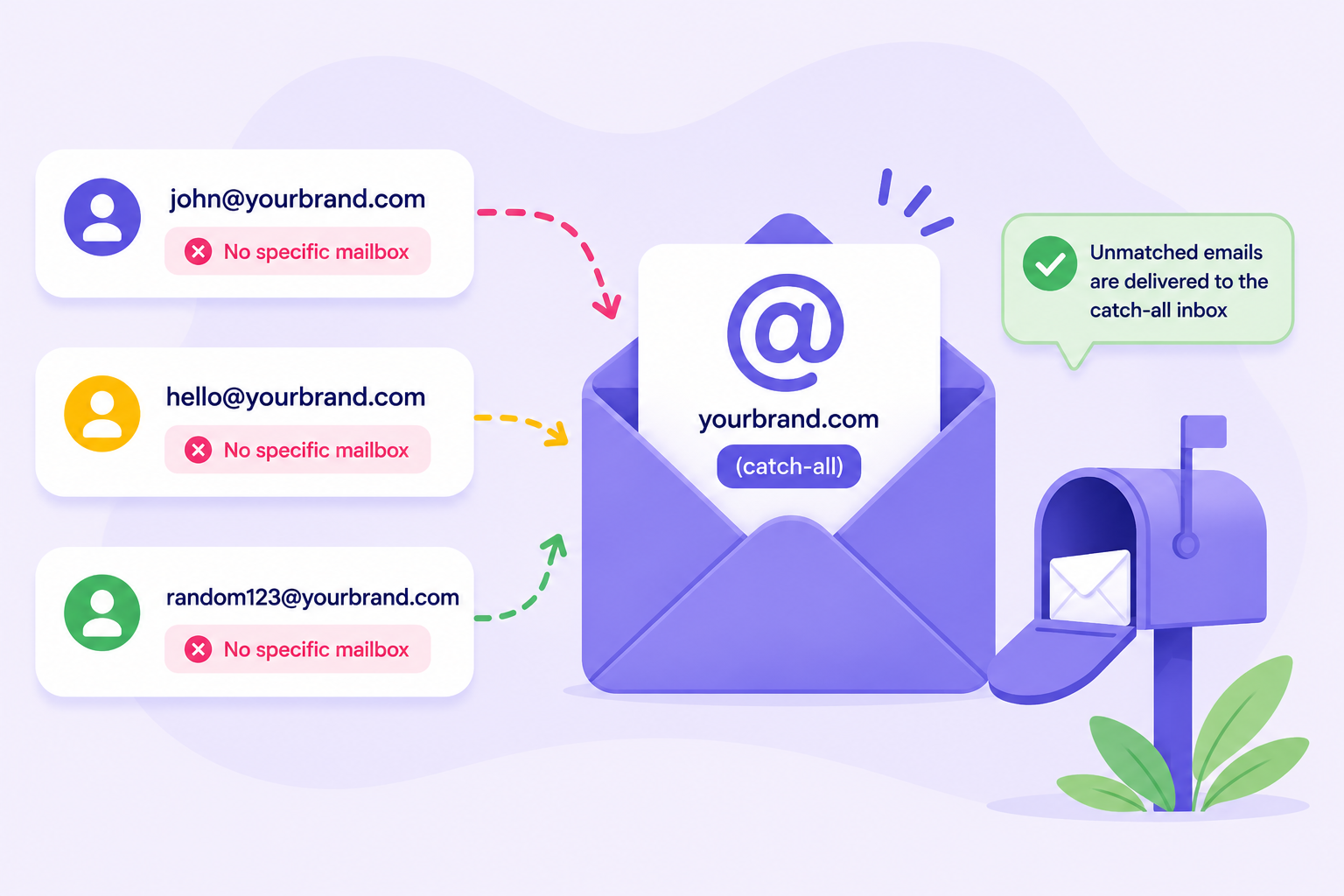
In that sense, catch-all email servers may appear to accept all email addresses addressed to the domain, including recipient names that were never created as individual mailboxes.
A regular domain can behave differently when the recipient name is not recognized.
alex@business.com may be accepted because Alex has a mailbox. If random5892@business.com has no corresponding mailbox, the mail system may reject it.
Not all domains behave identically, and responses can vary between email service providers. The main difference is that a regular domain does not intentionally accept all recipient names simply because they use the correct domain.
Here is the same scenario on two different domains:
Both sides use ordinary email formatting. What changes is how the mail system handles an unrecognized recipient.
A catch-all domain may appear willing to accept mail addressed to different recipient names, while a regular domain may reject a recipient it does not recognize. That difference happens behind the address, so you cannot see it just by looking at the email.
No. You cannot identify a catch-all email from its appearance alone.
The recipient name will not give it away. Neither will the email format, department name, or how professional the address looks. An address such as partnerships@company.com could look completely normal without revealing anything about the domain's catch-all status.
The reason is simple. Catch-all status depends on the domain's mail configuration, and that information is not visible in the email address itself.
For anyone verifying email addresses, appearance can help you spot obvious formatting problems, but it cannot tell you how the domain handles unknown recipients. That requires careful testing of the domain’s mail response.
An email verifier can identify catch-all domains by checking how the receiving mail server responds to different recipient names.
Suppose you want to check an address at company.com. A verifier may also test an unlikely address, such as random839427@company.com. If the catch-all server appears willing to accept that address too, it can signal that the domain uses catch-all handling.
That tells you something useful about the domain, but it does not settle the status of the original mailbox or provide enough information for informed decisions about the individual address.
A catch-all email verification tool can evaluate the individual address further when the domain-level check cannot confirm the mailbox. To verify catch-all emails, review the address-level result rather than relying only on the domain’s catch-all response.
For your email list, the examples point to one practical conclusion. Don’t automatically treat every catch-all result as valid or invalid.
A catch-all contact could belong to a real person or it could be one of the risky email addresses that standard verification cannot resolve. A generic catch-all result tells you how the domain responds, but not if that particular mailbox exists.
For list management, that distinction is useful. If your verifier stops at a generic catch-all result, you may need to segment catch-all addresses until they receive dedicated verification.
Once further verification confirms an address as valid, you can treat it like another verified contact. Invalid email addresses can be removed or suppressed so you are not spending time and resources on contacts you cannot use.
That helps you avoid wasted effort and prevents you from automatically discarding valuable leads simply because they came from a catch-all domain.
A spam trap is a separate type of email risk and should not be treated as another name for a catch-all email address.
From there, Listmint can help resolve those catch-all contacts further.

A real employee address and an address with no corresponding mailbox can both sit on a catch-all domain. Standard verification may identify that behavior, but the individual address can still remain unresolved.
Listmint takes verification further by combining standard SMTP and dedicated catch-all verification in one platform.
Catch-all or risky results can make up 30–40% of a lead list, potentially leaving a sizeable portion of contacts unresolved after standard verification.
Those catch-all addresses receive further evaluation and one of two dedicated results:
That gives email marketers and teams running cold email campaigns a more useful result for catch-all addresses that might otherwise remain unresolved after standard verification.
A catch_all_valid address can be treated as a verified address, while a catch_all_invalid result tells you the address should not be used.
Verifying these contacts before you send emails can help reduce bounces and protect sender reputation by identifying invalid addresses before a campaign.
You can verify catch-all emails in existing lists or check new addresses through Listmint's real-time API. Catch-all verification does not require a verification email to be sent to the recipient.
Listmint also offers its API to businesses that want to provide standard and catch-all email verification within their own products or email marketing workflows.
A catch-all email is set up at the domain level to accept messages sent to recipient names that do not have their own mailboxes. Depending on the configuration, those messages may be routed to a designated inbox or handled according to the domain’s mail rules.
If an email is catch-all, its domain is configured to accept mail for unrecognized recipient names. That means an address may appear accepted even when the individual mailbox has not been confirmed.
A typical business email address might look like alex@company.com for an individual or sales@company.com for a department. The format can look completely normal on both catch-all and non-catch-all domains.
A catch-all address does not automatically hurt inbox placement, engagement metrics, or domain reputation. The individual mailbox may be valid or invalid, which is why confirming its status is useful before sending messages. Verification also cannot tell you if a recipient will become one of your engaged contacts.
No. Catch-all status does not mean an address is associated with phishing attempts, spam complaints, or other unwanted messages. It only describes how the domain handles mail sent to recognized and unrecognized recipient names. Legitimate businesses can use catch-all accounts, and real mailboxes can exist on those domains.