It's frustrating to put effort into an email campaign only to wonder how many people actually received it.
You might have a good contact list and a message worth sending, but that doesn't guarantee your emails will reach subscribers' inboxes. Some may bounce, and others could end up in the spam folder.
Mailbox providers consider several things before accepting or filtering emails, including authentication, sending history, list quality, and recipient complaints.
The good news is that you can address many of these issues with the right practices.
If you want to improve email deliverability, this guide walks through 10 practical steps to help your messages reach more of the people you intended to contact.
Email deliverability refers to how successfully your emails reach the inbox after being accepted by a receiving mail server. It's often confused with email delivery, which simply means the receiving server accepted your message. An accepted email can still end up in spam.
For email marketing deliverability, mailbox providers such as Gmail and Outlook use different signals to decide where messages belong. These are the main factors that affect email deliverability:
These signals help internet service providers and mailbox services assess incoming mail. Improving them gives your messages a better chance to reach the inbox.
Improving email deliverability starts with checking how your emails are sent and what might prevent them from reaching the inbox.
Here are 10 practical steps to help you identify common problems and improve your sending practices.
Before sending campaigns, make sure receiving mail servers can verify that your emails genuinely come from your business. Email authentication helps prevent impersonation and reduces the risk of legitimate messages being rejected or marked as spam.
Start by configuring three authentication protocols for your sending domain:
Google requires SPF or DKIM for senders to personal Gmail accounts. Senders reaching approximately 5,000 or more messages per day to these accounts must use SPF, DKIM, and DMARC. Yahoo also requires all three for bulk senders.
If you use an email platform, check its domain authentication settings and follow its DNS instructions. Properly configured email infrastructure helps receiving servers recognize legitimate messages.
Confirm that your sending service uses TLS and has valid forward and reverse DNS records. Your provider usually manages these settings.
Even with your domain properly authenticated, sending to addresses that no longer work can hurt your deliverability. Invalid email addresses often lead to hard bounces because the receiving server cannot find the intended mailbox.
Email lists can collect typos, outdated contacts, disposable accounts, and fake email addresses over time. Poor-quality lists may also contain spam traps, which are addresses used to identify suspicious sending practices.
To reduce these risks, verify new addresses as they enter your database. Real-time verification can help catch problems during collection, while bulk verification lets you check older or imported lists before launching email campaigns.
Pay attention to the results, too. Remove addresses confirmed as invalid and review risky or uncertain ones before deciding to send.
Catch-all domains need extra attention because they may accept messages without confirming that a specific mailbox exists. Standard SMTP checks cannot always determine if these addresses are usable.
Tools like Listmint offer additional catch-all verification to help you identify which contacts are more likely to be valid before sending.
Email verification won't guarantee inbox placement, but it can help prevent avoidable bounces before your campaign begins.
People are more likely to trust emails from businesses they recognize and have agreed to hear from. If someone never signed up for your marketing emails, they may ignore your message or report it as spam.
For email marketing, start with a clear sign-up process. Let people know they're joining your mailing list and what kind of messages they'll receive.
You can also use double opt-in, which asks subscribers to confirm their email address before adding them to your list.
Avoid buying or scraping contact lists for your email marketing program. Having someone's email address doesn't automatically mean they've agreed to receive promotional messages. The same applies to customers who provided their details for a purchase or another unrelated purpose.
Google's sender guidelines recommend sending commercial emails only to people who have agreed to receive them.
Getting permission from the start helps your business avoid sending spam to people who never asked for your emails. It also reduces the risk of complaints and helps protect your sending reputation.
When recipients mark your emails as spam, it tells mailbox providers that they don't want to receive your messages. Too many complaints can lead to a poor sender reputation, making it harder for your emails to reach the inbox.
Your spam complaint rate measures how frequently recipients report your messages as spam. The exact calculation depends on the mailbox provider, so compare results using the provider's own reporting.
For Gmail users, Google advises keeping spam complaint rates under 0.1% and preventing them from reaching 0.3% or more. Yahoo also requires bulk senders to keep complaint rates below 0.3%.
If complaints start increasing, look at which campaigns received them. Check where those contacts came from, who received the messages, and if your sending frequency matched what recipients expected.
Addressing these issues early can help protect your reputation and reduce the risk of complaints affecting future inbox placement.
After sending a campaign, pay attention to addresses that fail to receive your emails. Continuing to send to bounced email addresses can create repeated delivery failures and contribute to deliverability issues.
Email bounces generally fall into two categories:
As an email sender, you should remove or suppress addresses that return permanent failures. For soft bounces, check the error message before deciding what to do next. A temporary problem may resolve on its own, but repeated failures deserve further investigation.
If your bounce rate suddenly increases, review your sending platform's bounce reports and SMTP error codes. These can help you identify what's causing the failures and which addresses need attention.
The important thing is to stop sending to addresses confirmed as undeliverable, so the same problems don't keep affecting future campaigns.
A new sending domain or IP address has little sending history, so mailbox providers have limited information to judge its reliability. Sending thousands of emails right away can lead to temporary delays or rejections.
Start with smaller batches of subscribers who regularly engage with your emails. Increase your email volume gradually as your sending activity becomes more established. Avoid sudden spikes, especially when launching a new email program or moving to a different sending service.
If your business uses a dedicated IP address, warming it up is especially important because you're responsible for building its IP reputation.
Shared IPs may already have an established sending history, but their reputation depends on the activity of other senders using them. Your own domain reputation still plays an important role.
For businesses sending both email marketing campaigns and transactional emails, consider separating their sending traffic so promotional campaigns don't disrupt important messages like receipts and password resets.
Gradual, predictable sending can help establish a positive sender reputation over time, but there is no fixed warm-up schedule that works for every business.
Not everyone on your email list is still interested in receiving your messages. Continuing to send campaigns to unengaged subscribers can lead to more ignored emails and potentially more spam complaints.
Review subscriber engagement to understand how people interact with your business. For example, someone who recently clicked a link or made a purchase may be more interested than a contact who hasn't interacted with your business in months.
Use available engagement metrics, such as clicks, purchases, and recent customer activity, to separate active contacts from inactive subscribers. Don't rely on open rates alone, since email privacy features can make them unreliable.
For contacts who haven't engaged in a long time, consider a targeted re-engagement campaign to see if they still want to hear from you. If they remain inactive, reduce how often you contact them or suppress them from future campaigns.
For email marketers, the idea is simple: focus your sending efforts on people who continue to show interest, rather than repeatedly contacting everyone on your list.
If someone no longer wants to receive your emails, they should be able to unsubscribe without any hassle. When people can't find a way to opt out, they may mark your email message as spam just to stop receiving it.
Make sure every marketing email includes a visible unsubscribe link that works. Don't require subscribers to log in, answer unnecessary questions, or go through several steps to leave your list.
For bulk senders, Google requires marketing and subscribed messages to support one-click unsubscribe through specific email headers, along with a visible unsubscribe link. Yahoo also requires easy unsubscribing and expects requests to be honored within two days.
The U.S. CAN-SPAM Act also requires commercial emails to provide a working opt-out method and honor requests within 10 business days. Process requests promptly rather than treating the legal deadline as a waiting period. Google also recommends honoring unsubscribe requests within 48 hours.
Once someone unsubscribes, remove them from future promotional sends promptly. An easy unsubscribe process helps reduce unnecessary spam complaints and shows recipients that your business respects their preferences.
People sign up for your emails because they're interested in what your business offers. If your messages no longer match their expectations or arrive too often, they may lose interest or mark them as spam.
Before sending a campaign, check that the message delivers what your subscribers originally signed up for. For example, someone who signed up for product updates shouldn't suddenly receive daily promotional emails.
Pay attention to your subject lines, too. They should accurately describe what's inside the email. Misleading or deceptive subject lines can trigger spam filters and make recipients less likely to trust your messages.
Keep your sending frequency reasonable and consistent. If you normally email subscribers once a week, suddenly switching to daily messages could lead to frustration.
When you change your content or sending schedule, pay attention to complaints and unsubscribes. An increase may indicate that your emails are no longer meeting subscribers' expectations.
Improving deliverability doesn't end once you've sent a campaign. You also need to check what happens afterward so you can catch potential problems before they affect future sends.
Start with the reports from your email service provider. These usually show bounces, temporary delivery failures, and unsubscribe activity. Review these email performance metrics after each campaign, along with spam complaints where available.
You can also use email deliverability tools for more specific checks:
Postmaster Tools data may be delayed or unavailable at low sending volumes. Missing data does not necessarily mean your sending setup is healthy.
Other key deliverability metrics include reputation indicators, such as Sender Score, a third-party measure of IP reputation. However, these scores don't represent how every mailbox provider evaluates your emails.
You can also send messages to test email addresses at different providers to check for obvious delivery problems, but test results won't represent every recipient's experience.
Make it a habit to monitor email deliverability after campaigns so you can identify issues early.
Before sending your next campaign, it's worth checking a few things that could affect where your emails end up. Even small issues, like an outdated contact list or incorrect authentication settings, can lead to unnecessary delivery problems.
Use this checklist to review the email deliverability best practices covered above and confirm that your sending setup is ready.
These best practices won't guarantee inbox placement, but they give your business a practical way to catch avoidable problems before sending.
After making changes, you'll want to know if they're actually helping. Start with your previous campaign results as a baseline, then compare them with newer campaigns sent to similar audiences.
Look for these signs of improvement:
Keep in mind that successful inbox placement doesn't always mean appearing in the primary inbox. Gmail's Promotions tab is also part of the inbox, and placement can vary for each recipient's inbox.
Open rates alone aren't reliable proof of improvement because privacy features can affect tracking. Look for positive trends over several campaigns, since reputation recovery takes time.
A healthy email list gives your campaigns a better starting point. Sending to invalid or uncertain addresses creates unnecessary bounce risks, even when your domain authentication and sending practices are properly configured.
Listmint helps businesses improve deliverability by verifying standard and catch-all email addresses before outreach. It helps you identify more usable contacts, reduce avoidable bounces, and make better use of the lead lists you've already built.
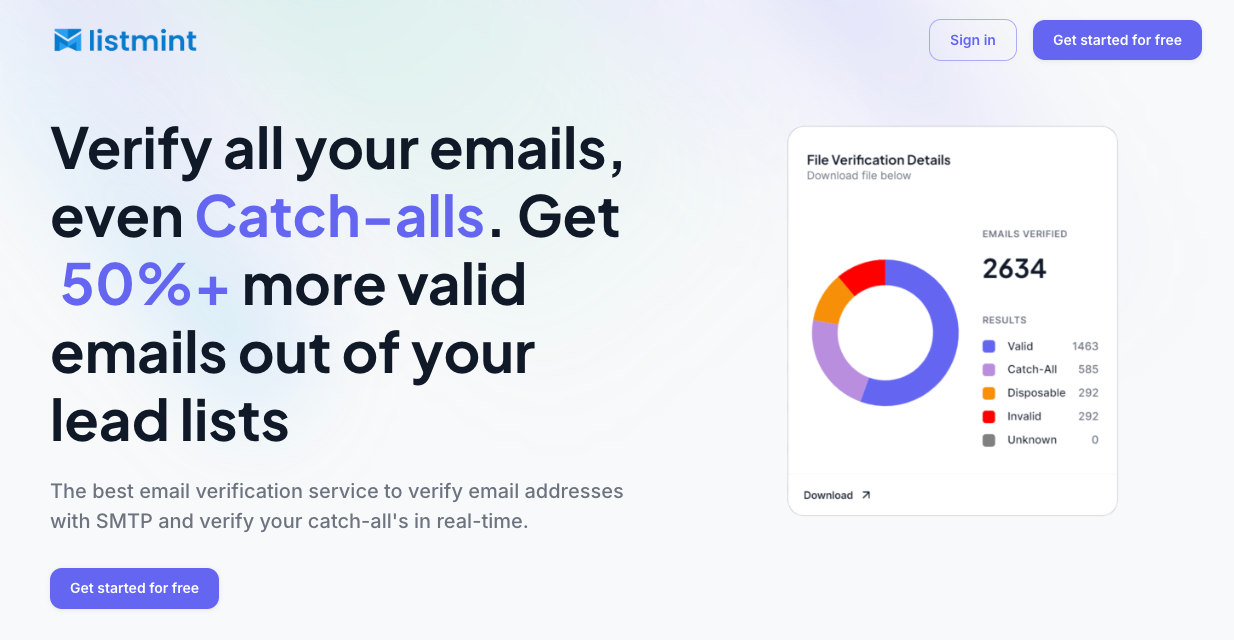
Listmint combines SMTP verification with dedicated catch-all verification, so you can check both types of addresses without switching between tools.
Standard verification checks email addresses without sending an actual message. For catch-all domains, Listmint goes further with additional verification and returns specific results such as catch_all_valid and catch_all_invalid.
You can use valid results for outreach and remove addresses confirmed as invalid, without automatically excluding potentially valuable B2B contacts just because they belong to catch-all domains.
Listmint has verified over 1 billion emails, with 99%+ SMTP verification accuracy and 99%+ catch-all verification accuracy.
Its dedicated catch-all verification helps businesses recover contacts that standard verification may leave unresolved.
Listmint achieves up to 84% valid results, compared with approximately 55% from other verifiers, helping businesses identify over 50% more valid leads from their lists.
That means more verified contacts available for outreach, fewer wasted leads, and better opportunities for email marketing success without sacrificing list quality.
Listmint supports bulk verification for existing databases and real-time verification for new contacts.
Businesses can verify their lists before campaigns, and agencies or software platforms can use Listmint's API to build standard and catch-all verification into their workflows.
Catch-all results are available in real time without sending verification emails, so teams can act on verified contacts without waiting for a separate manual process.
For businesses building a successful email marketing program, Listmint helps keep contact data verified as lists grow, so teams can spend more time reaching usable leads and less time dealing with invalid addresses.
Better list quality supports healthier sending practices, but authentication, recipient consent, and sender reputation still influence inbox placement.
The 30/30/50 rule is an informal cold email sales benchmark popularized by Close. It suggests aiming for a 30% open rate, a 30% response rate among recipients who opened the email, and a 50% conversion rate among those who responded.
These are sales funnel benchmarks, not email deliverability requirements.
The 60/40 rule is an informal email design guideline that recommends approximately 60% text and 40% images. It helps keep emails readable, especially when an email client blocks images. However, this ratio is not a mailbox-provider requirement or a guarantee of inbox placement.
The 3-21-0 rule is an email management method that recommends checking your inbox three times a day, spending 21 minutes on each session, and aiming for zero unprocessed emails afterward. It helps people manage their inboxes more efficiently but does not directly improve email deliverability.
The 12-second rule is an informal email writing guideline suggesting that recipients may decide within roughly 12 seconds whether to continue reading a message.
It encourages senders to use recognizable sender names, accurate subject lines, and direct opening sentences. The 12-second figure is not a universal measure of how people read emails.
Avoiding spam trigger words alone does not guarantee better email deliverability. Several factors affect email deliverability, including email authentication, sender reputation, spam complaints, and message content.
Modern spam filters look at these signals together, so focus on honest subject lines, relevant content, and reliable sending practices rather than avoiding specific words.